


Translating a CAD drawing is not really a translation problem. It’s a layout problem wearing a translation costume! The words are the easy bit. The hard bit is getting Slovak, German or English text into a space that was sized for a different language, without nudging a single dimension, layer or symbol.
Here’s how it works in practice, what you should prepare, and what to check before anything goes back to the shop floor or the authorities.
What CAD drawing translation actually involves
A translator working on a technical drawing handles the text that lives inside the file: titles, notes, callouts, tables, title blocks and annotations. The geometry stays exactly as the engineer drew it. Only the language changes.
That sounds simple. It isn’t, for three reasons:
- Text is scattered. It sits in the model, in layouts, in blocks and in tables, not in one tidy column.
- Space is tight. A translated note can be 20 to 30% longer or shorter than the source, and it still has to sit next to the same leader line.
- Meaning is technical. One wrong term in a tolerance note or a material specification can mean a rejected batch.
If you want the bigger picture on this discipline, our guide on what technical translation is covers the fundamentals.
Which files and elements can be translated
Most AutoCAD drawings arrive as DWG, sometimes as DXF. According to a TransTools workflow guide on CAD translation, the objects that can be translated include TEXT, MTEXT, dimension leaders, tables, block text and attributes.
A quick reference:
| Element | What to watch for |
|---|---|
| TEXT (single line) | Long sentences are often split across several objects, so context gets lost |
| MTEXT (multiline) | Best format for translation: text can reflow inside its box |
| Dimension text and leaders | Keep numeric values and units untouched, translate only wording |
| Tables | Column width limits the length of the translated text |
| Block text and attributes | Edit once in the block and it updates everywhere it is used |
One more thing: if all you have is a PDF or a scan, the text is usually not editable. Ask your engineer for the native DWG or DXF. It saves time and money, and it removes the risk of retyping errors.
Preparing the drawing before it reaches a translator
A little preparation changes everything. The TransTools guide recommends combining split single-line text objects into MTEXT, so a sentence is translated as a sentence and the result fits its existing space and formatting.
Here’s our checklist for you:
- Send the native file (DWG or DXF), plus a PDF of the original so we can see the intended appearance.
- Say which layouts and layers matter. Do you need model space translated, or only the sheets?
- Merge fragmented notes into MTEXT where you can. If you can’t, tell us and we’ll flag them.
- Share what you already have: glossaries, previous translations, customer or standards references.
- Name the target audience. A drawing for a Slovak fabricator reads differently from one for a notified body.
- Flag fonts. If the file uses a custom font, send it, or the Slovak diacritics (ä, ô, ľ, š, č, ž) may turn into question marks.
On that last point: ISO’s own drawing instructions say that technical-drawing fonts must conform to ISO 3098. Fonts are not decoration here, they are part of readability.
Translating text without changing dimensions, symbols or layers
The golden rule: we touch text, never geometry. In a good workflow that looks like this.
- Text is extracted from the file into a translation environment, with its position and object type kept.
- Translators work on full sentences with context, not orphaned fragments.
- Translated text is re-inserted into the same objects, on the same layers.
- A person with technical eyes checks every sheet visually against the original.
That last step matters more than any tool. Automatic extraction and re-insertion are fast, but only a visual check catches an overlapping note or a truncated callout. Machine translation can speed up the first draft of repetitive notes, yet drawings are short, dense and context-poor, which is exactly where raw machine output goes wrong. That’s why we usually recommend a human-led workflow with AI support for this kind of content, such as HumanPlus or HumanPro, rather than machine output alone. Curious how that balance works? Our piece on the role of AI in localisation explains it.
Practical tips for fitting text:
- Use approved abbreviations, not improvised ones.
- Keep sentence style telegraphic, as drawings usually are.
- Never translate part numbers, standard designations or numeric values, and keep units as the drawing states them.
- If a note truly cannot fit, ask the engineer to enlarge the box rather than shortening the meaning.
Getting the terminology right
Terminology is where drawing translation is won or lost. Slovak technical vocabulary has plenty of traps: Czech-influenced terms, English loanwords, and different words in different industries for the same part.
An academic paper on terminology and the internet in Slovak translation warns that online terminology may be unverified. Its advice is simple: judge how reliable each source is, check terms against several sources, and consult an expert when a concept is unclear. Good translators do this by habit, and it’s a skill worth reading about, for instance in this piece on what makes a top translator.
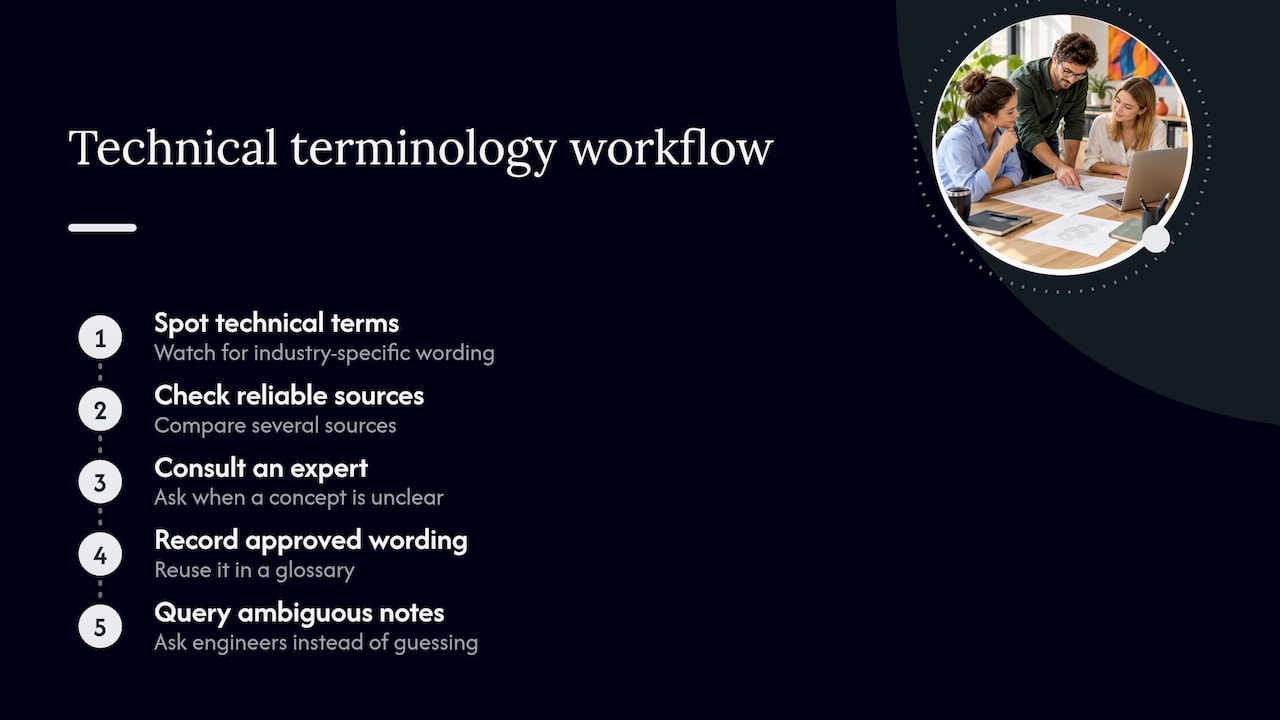
For you as the client, the best thing you can do is build a glossary once and reuse it. Our guides on terminology consistency and terminology harmonization show how to keep one set of terms across drawings, manuals and specifications.
Ambiguous notes deserve a query, not a guess. “Break all sharp edges” or a note referring to an unnamed standard should go back to the engineer. A translator who asks questions is a translator you want.
Quality checks before the drawing goes back
Before delivery, every translated drawing should pass a checklist. Ours looks like this:
- Completeness: no source-language text left behind in any layout, block or table.
- Numbers and units: identical to the source, character by character.
- Terminology: matches the agreed glossary.
- Layout: no overlaps, no truncated text, no shifted leaders.
- Layers and objects: structure unchanged from the original file.
- Standards references: correct and in the form your target market uses.
- Second pair of eyes: a reviewer who did not do the translation.
Want to see how a formal process is built? Have a look at our practical guide to translation quality assurance.
Confidential and regulated drawings
A drawing can be a company’s crown jewels. Defence components, pharmaceutical equipment and proprietary machinery all fall here. So treat the translation like any other data transfer.
Before you send files, agree on these points:
- A signed confidentiality agreement with the language provider and any freelancers involved.
- Who may see the files, and where they are stored.
- How files travel: secure transfer, not ordinary email attachments.
- What happens to files and translation memories after the project.
- Whether personal data appears in title blocks (names of designers or approvers), which brings GDPR into play.
If the drawing supports a legal or regulatory submission, our overview of the role of translation in legal compliance and the guide to certified translation professionals will help you decide whether a certified translation is needed.
Our view: treat drawings as a mini localisation project
Here’s what we’ve learned since 2014: the cheapest way to translate a drawing is to prepare it well and write the glossary first. Teams that skip this pay twice, once for the translation and once for the rework.
We look at a drawing as a small localisation project. It needs the right specialist, a defined file workflow, a terminology source and a visual check. It also needs a human who understands what the drawing is for, because a drawing is an instruction, not a story.
We work with clients in engineering, manufacturing, defence, medical and IT, where one wrong word has real consequences. So we’d always rather ask you one more question than hand back a drawing that looks right and reads wrong.
— glocco®
Need drawings translated? Let’s talk
glocco® translates technical content across 76 languages, with specialist teams for engineering, legal, medical and software projects. Send us a sample drawing and tell us the target language and use. We’ll tell you how we’d handle it, from file preparation to final visual check. Start with HumanPro for technical content, or get in touch via our homepage.
FAQ
Can I send a PDF instead of a DWG file?
You can, but it’s not ideal. PDF text is often not editable, so someone has to retype it, which adds cost and the risk of errors. If you can, send the native DWG or DXF as well as a PDF for reference.
Will translation change my dimensions or layers?
It shouldn’t. Only text objects are translated, and the geometry, layers and numeric values stay as they were. A visual comparison with the original after re-insertion confirms nothing has moved.
What if the translated text is longer than the space?
This is common. The first options are to adjust text size or wrap within the existing box, using MTEXT where possible. If it still doesn’t fit, we flag it to your engineer instead of cutting meaning.
Is machine translation good enough for technical drawings?
For short, repetitive notes it can give a useful first draft. Drawings carry little context and a lot of risk, so we recommend human review of every drawing, especially for regulated or safety-relevant content.
Sources
- Translation of CAD drawings (DWG, DXF) with TransTools
- ISO drawing instructions, August 2020
- Terminology and the Internet in the Context of Slovak Translation


