


Use human-reviewed closed captions, synchronised to the audio, not auto-captions on their own. Treat AI transcripts as a draft only, then run a specialist legal edit and a second quality check before anything goes live. That two-step human review is what keeps captions accurate, WCAG-compliant, and safe to rely on in a legal setting. We build exactly this process ourselves.
What makes captions legally and technically correct (WCAG, EAA, and local rules)
Captions aren’t just “nice to have” for legal video. They’re a compliance requirement, and the bar is set higher than most people think.
WCAG 2.2 sets the baseline: captions for pre-recorded media must be accurate, synchronised with the audio, and include speaker identification and non-speech sounds (think “[phone ringing]” or “[recording paused]”). On top of that, the European Accessibility Act adds obligations for access services on platforms and interfaces, with the detail depending on national transposition and AVMSD rules. In Slovakia, the Media Services Act goes further still, setting technical subtitling specifications through Act No. 264/2022, including provisions for viewers with hearing impairment.
What does “correct” look like in practice?
- Captions include every spoken word, not a summary.
- Each speaker is clearly labelled, every time they speak.
- Non-speech sounds relevant to meaning are described in brackets.
- Reading speed stays manageable, typically within a comfortable reading range so viewers can actually read and absorb the captions before they change.
Reading speed matters more than people assume: WCAG guidance notes captions should sit within that 100 to 200 words per minute band so viewers can actually read and absorb them before the next line appears.
Why legal videos need specialist subtitling, not generic captions
A generic captioning tool doesn’t know the difference between “prejudice” the everyday word and “prejudice” the legal term. That gap matters a lot more in a courtroom recording than in a product demo.
Legal audio is full of traps for automated systems: Latin phrases, statute numbers, party names, acronyms specific to a jurisdiction, and formal phrasing that sounds nothing like everyday speech. Practitioner guidance from Jisc is blunt about it: AI systems frequently mishandle specialist terminology and speaker attribution, and in legal contexts that can shift meaning entirely. Mislabel who said what in a deposition clip, and you’ve created a factual error, not just a typo.
Common failure points to watch for:
- Overlapping speech during cross-examination or panel discussions.
- Poor audio quality from courtroom recording equipment or remote hearings.
- Acronyms and case citations rendered as nonsense or mistranscribed numbers.
Pro Tip: Never treat an AI transcript as the finished product for legal footage: it’s a starting point that still needs a specialist’s eyes on every line.
Step-by-step workflow to create audit-ready captions for legal video
Getting from raw footage to a defensible, compliant caption file follows a fairly consistent path. Jisc’s recommended workflow maps closely to what we run at glocco®, and it looks like this:
- Prepare source materials. Supply the original video files, a speaker list, and a glossary of legal terms, names, and case references.
- Confirm deliverables. Agree the format upfront, usually SRT or TTML closed caption files plus a clean transcript.
- Generate a draft transcript with timecodes. AI transcription is fine here, but it’s labelled clearly as a draft, never a final product.
- Specialist human edit. A linguist familiar with legal terminology corrects wording, fixes speaker attribution, and applies the agreed glossary.
- Second human QC pass. A separate reviewer checks synchronisation, reading speed, and that non-speech sounds are captured correctly.
- Final delivery. Closed caption files, transcripts, version notes, and a compliance sign-off go out together, not as scattered pieces.
Keeping that audit trail matters as much as the captions themselves:
- A record of who drafted, who edited, and who signed off.
- Version notes if corrections were made after initial delivery.
- A copy of the glossary used, for consistency on future videos.
Section508 is clear that auto-generated captions are a good starting point but aren’t accurate enough on their own to meet accessibility standards. Human editing is the step that turns a draft into something you can actually publish.
Production tips that lower errors and subtitling costs
Here’s the bit nobody tells you until the invoice arrives: how you record the video has a direct effect on how much the captioning costs and how many errors creep in.
- Use lavalier or close-range microphones rather than relying on room mics.
- Keep background noise to a minimum, especially in shared office or court corridor settings.
- Ask speakers to slow down slightly and avoid talking over each other during critical testimony.
- Avoid placing lower-third text where captions will later sit on screen.
- Supply any slides, exhibits, or scripted statements used during filming.
- Hand over a glossary of names, case numbers, and terminology before recording wraps, not after.
Accessibility planning guidance makes the case well: building captioning into the plan from day one avoids expensive retrofitting later and keeps terminology consistent across a whole case file or course series. A short “captioning brief” sent alongside the raw footage, covering names, acronyms, and speaker roles, saves hours of back-and-forth during editing.
Pro Tip: Send your glossary before filming starts, not after. It’s the single cheapest way to cut editing time on the back end.
Editing and QA checklist: are your captions legally reliable?
Before anything goes live, run it against a checklist. This isn’t optional box-ticking, it’s what separates captions that hold up from ones that quietly introduce errors into the record.
- Confirm legal terms match authorised or verbatim phrasing, not a paraphrase.
- Check spelling, punctuation, and case references line by line.
- Verify speaker attribution for every turn, labelling unidentified speakers consistently throughout.
- Check timing: captions should appear in sync with speech and disappear before the next line starts.
- Confirm reading speed sits within a comfortable range for viewers.
- Make sure non-speech sounds and music cues are noted where they carry meaning.
- Deliver closed caption files (SRT or TTML) rather than captions burned into the video.
- Keep a sign-off record: who reviewed, who approved, and when.
UC Berkeley’s accessibility guidance recommends closed captions over open or burned-in captions precisely because separate files can be edited, toggled off, and checked during a compliance audit. That flexibility matters a great deal once a video is years into a case file and needs a correction.
Legal teams sometimes use a technique borrowed from translation quality control: checking a sample of captions against the original audio independently, similar in spirit to back translation used to verify sensitive translated content. It’s an extra half hour that catches errors a single read-through misses.
Handling confidential and sensitive legal content securely during subtitling
Legal footage often includes material that simply can’t leak: settlement terms, witness identities, medical details, or ongoing investigations. The subtitling process needs to treat that footage with the same care as the original file.
In practice, that means working with vendors who use secure file transfer rather than email attachments, restrict access to the smallest possible team, and sign confidentiality or non-disclosure agreements before they see a single frame. Ask who touches the file at each stage: transcriber, editor, QC reviewer, project manager. The fewer hands, the lower the risk.
Storage matters just as much as transfer. Files should sit on access-controlled systems, with deletion schedules agreed in advance rather than left open-ended. For material tied to active litigation, ask whether draft transcripts and intermediate files get purged once the final deliverable is signed off, not just archived indefinitely “just in case.”
It’s worth asking any provider directly: who can see this footage, where does it live while work is in progress, and what happens to it once the project closes? A vendor with a clear answer to all three has probably thought this through properly. One without a clear answer is a risk you don’t need to take on sensitive material.
Localisation challenges across different legal systems
Captioning a legal video for one jurisdiction is hard enough. Doing it across several gets genuinely tricky, because legal systems don’t just use different words, they use different concepts.
A term like “discovery” means something specific in common law systems and doesn’t map neatly onto civil law procedure at all. Court titles, procedural stages, and even the structure of a hearing can differ enough that a literal translation of a caption creates confusion rather than clarity. This is where a translator with general legal knowledge isn’t quite enough: you need someone who understands how the specific jurisdictions involved actually operate.
Names of courts, statutes, and official bodies also need consistent handling. Do you translate the name of a court, or keep it in the original language with a brief explanatory note? There’s no single universal answer, but the decision needs to be made deliberately and applied consistently throughout a video, not improvised line by line.
For multilingual legal content, a shared glossary agreed before work starts (covering key terms, proper nouns, and how to handle untranslatable concepts) keeps captions consistent across every video in a series, even when different linguists work on different episodes or hearings.
Compliance beyond WCAG: court and government rules to check
WCAG and national media legislation cover general accessibility, but legal video often sits under extra rules depending on where and how it’s used.
Court systems frequently have their own technical requirements for recordings submitted as evidence or published as part of public proceedings, covering file format, retention periods, and chain-of-custody documentation. Government bodies publishing legal education or regulatory guidance videos may need to meet procurement-linked accessibility standards on top of general web accessibility law. None of these replace WCAG, they sit alongside it.
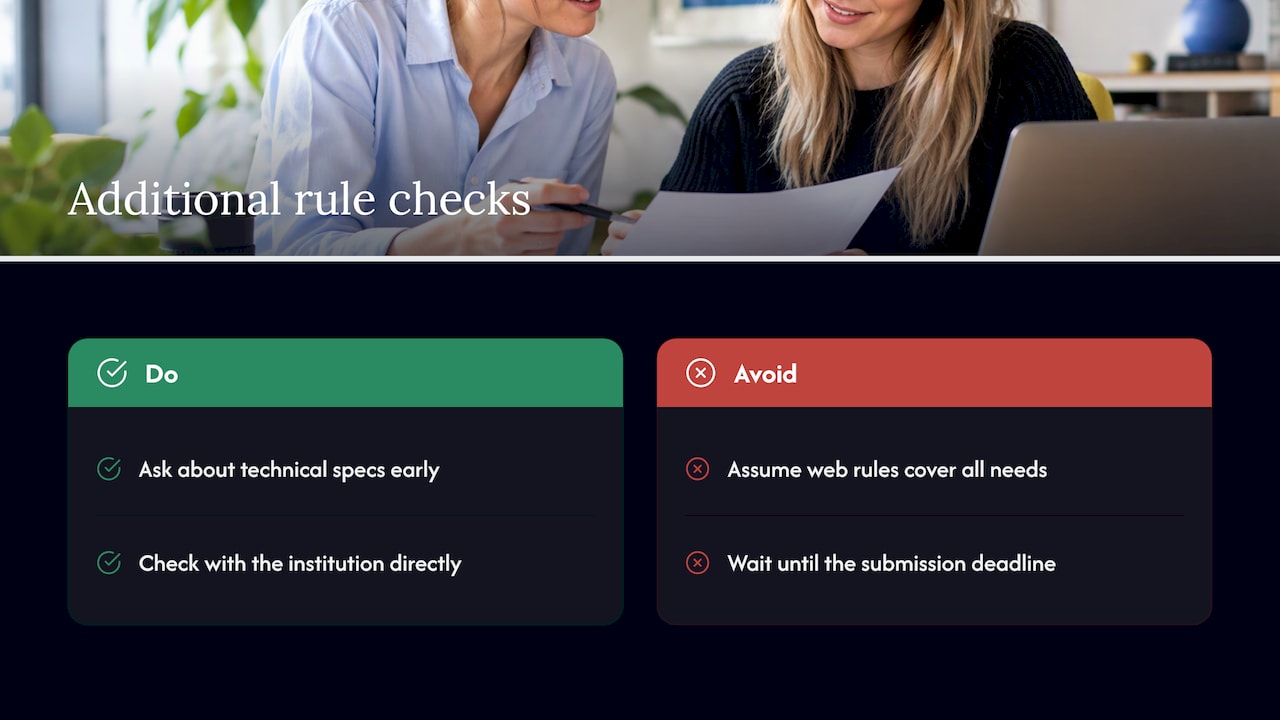
The practical approach is to ask early, not late: does the court, regulator, or institution publishing this video have its own technical specification for captions or transcripts? Section508.gov’s accessibility playbook makes the point that planning for these requirements at the start of a project avoids expensive rework once a video is already recorded and a submission deadline is looming.
When in doubt, check directly with the court registry, regulator, or institution involved rather than assuming general web accessibility rules cover every requirement. Technical specifications for evidential video can be stricter than general broadcast rules, and missing one can mean a resubmission.
Fitting subtitles into existing legal video platforms
Captions don’t exist in isolation, they need to work inside whatever system actually plays the video: a case management platform, a courtroom display system, or a learning management system for legal education content.
Most modern platforms accept standard caption formats like SRT or TTML, which is exactly why delivering closed captions as separate files (rather than burning text into the video) matters so much. A separate file can be uploaded, swapped, corrected, or translated into another language without re-editing the video itself. Burned-in captions lock in whatever accuracy level existed at export time, permanently.
Courtroom systems and evidence management platforms sometimes have narrower format requirements than typical web video platforms, so it’s worth confirming early which formats a given system actually accepts before final delivery. The same applies to learning platforms used for legal education: check whether the system supports multiple caption tracks if the content needs more than one language.
Testing the caption file inside the actual destination platform, not just in a generic media player, catches formatting issues before they become a last-minute scramble.
Why a human-first, two-check workflow is the safest route
Our video subtitling is built around exactly this principle: nothing goes out the door after a single pass. Every legal caption file receives a specialist edit for terminology and speaker attribution, then a second, independent QC check for timing, readability, and non-speech cues, with a compliance audit against WCAG and relevant national rules.
For anything particularly sensitive, we’d always recommend starting with a sample review before committing to a full project. A short pilot lets us agree a glossary and house style for your legal terminology together, so the rest of the series runs smoothly from the first file.
— glocco®
How to get started with compliance-focused subtitling
Need captions that hold up to scrutiny, not just ones that look fine on a quick scroll? Our video subtitling service runs on the two-human-check workflow we’ve described throughout this piece: specialist legal edit, independent QC, and deliverables in SRT or TTML alongside a clean transcript.
Get in touch for a sample caption review or a straightforward quote, no guessing required on what you’ll get back.
FAQ
Are auto-generated captions accurate enough for legal videos?
No. Section508.gov guidance is clear that auto-generated captions are a useful starting point but aren’t accurate enough on their own to meet accessibility standards. They need a human edit for terminology, speaker labels, and non-speech sounds before publication.
What caption file format should legal videos use?
Closed caption files such as SRT or TTML are the standard recommendation, rather than captions burned directly into the video. UC Berkeley’s accessibility guidance notes separate files can be edited, toggled, and checked during a compliance audit, which burned-in text can’t do.
What reading speed should legal video captions follow?
WCAG guidance points to roughly 100 to 200 words per minute as a comfortable reading range for captions. Going faster risks viewers missing key details, which matters a great deal when the content is evidential or instructional.
How much does professional legal video subtitling cost?
Pricing depends on specialisation, turnaround, and compliance requirements, so it’s best checked directly with a provider for your specific project. We offer a transparent pricing structure for video subtitling, available on request.
Does Slovak law require subtitles for certain video content?
Yes, the Slovak Media Services Act and its implementing decree set technical subtitling specifications, with Act No. 264/2022 including obligations for subtitles aimed at people with hearing impairment. The exact quotas and technical detail depend on the specific service and broadcaster, so checking the current text directly is worthwhile.
Sources
- Captions (Prerecorded) — Understanding WCAG 2.2
- Section508
- Act No. 264/2022 — Slovak Republic (titulky for hearing impaired)
- Video captioning and accessibility regulations — Jisc


