


Want the short version? If your video is public and features dialogue, you need synchronised closed captions that meet WCAG and, if your audience is in Slovakia, the display rules in Decree no. 318/2023 Coll. too. Skip the burned-in text. Add captions as a separate VTT or SRT track, then get a human to check every line before you hit publish. AI can draft it. AI cannot sign it off.
Compliance checklist: outputs you must produce before publishing video
Right, let’s get practical. Publishing a “compliant” video isn’t just about slapping subtitles on and hoping for the best. Auditors, regulators, and (frankly) your own legal team will want a paper trail. Here’s what needs to exist before you press go:
- Closed caption files in VTT (preferred) or SRT format, with speaker identification and non-speech audio noted (think “[phone ringing]” or “[Marek laughs]”)
- A full transcript for accessibility and audit purposes, separate from the caption file itself
- An audio-description track where visual information carries meaning that dialogue alone won’t convey, such as a chart flashing on screen
- A QA sign-off record, listing reviewer names, timestamps, and what was checked
- An accessibility statement published alongside the video, with a working feedback link for anyone who spots an error
Miss any of these and you’ve got a gap that’s genuinely visible to whoever’s checking your work, whether that’s a regulator, a client’s procurement team, or an internal auditor doing a spot check. None of this is bureaucracy for its own sake. It’s the difference between “we made an effort” and “we can prove exactly what we did and when.”
What WCAG and the Slovak decree actually require
Here’s where people get tangled up: WCAG sets the what, and the Slovak decree sets the how, at least for domestic display styling.
Under WCAG 2.1, three success criteria matter most:
- SC 1.2.2 — prerecorded video needs synchronised captions covering dialogue, speaker ID, and non-speech sound
- SC 1.2.4 — live video needs live captions, with allowances for latency
- SC 1.2.5 — audio description is required where visual content adds information dialogue doesn’t cover
Decree no. 318/2023 Coll. then adds the fine print for Slovak audiences: approved colour combinations, fixed positioning, a maximum of two lines on screen at once, a 42-character limit per line, and specific timing and speaker-differentiation rules.
Quick clarification, because this trips people up constantly: captions include non-speech audio and speaker labels; subtitles (in the traditional sense) usually just translate dialogue; a transcript is neither, it’s a standalone text document. Confusing the three is one of the most common compliance failures.
One statistic worth sitting with: automatic captions still need human editing for proper nouns, punctuation, and non-speech cues before they meet accessibility standards. AI alone doesn’t get you there.
A repeatable workflow that combines AI and human verification
Forget “one big push before launch.” Compliance titling works best as a proper pipeline, built into your production schedule from day one.
- Pre-production: Review the script for accessibility gaps, flag visual cues that need description, note speaker names (with correct spelling!), and agree terminology in advance if the content is technical or legal.
- Production: Record clean audio, embed timecode from the start, and keep a running speaker list as you shoot.
- Post-production, stage one: Run AI transcription first. It’s fast, and it gives you a solid timecoded base to work from.
- Post-production, stage two: Two human passes, not one. First, a technical review checking timing, speaker IDs, and non-speech annotations. Then a separate legal or content review confirming names, figures, and any regulated terminology are accurate.
- Delivery: Export closed VTT/SRT tracks, attach the transcript and audio description where relevant, and log formal QA acceptance.
Pro Tip: Build a single approved “master” caption file before you touch translation. Every multilingual version should trace back to that one verified source, not five separately AI-generated drafts. It saves you from correcting the same error six times in six languages.
This structure mirrors what industry accessibility guidance recommends: AI for speed, humans for accuracy. Marking accessibility needs at script stage, rather than bolting them on afterwards, also cuts rework dramatically further down the line.
Which files and player features keep captions compliant
Format choice matters more than people think. Here’s the short list:
- WebVTT (.vtt) is the preferred format for web deployment. It’s flexible, styleable, and widely supported.
- SRT remains fine as a fallback, but always deliver closed caption tracks, never rely purely on burned-in text baked into the video file. Closed tracks let users toggle captions on or off and work properly with assistive technology.
- Your player must be keyboard-operable, expose the caption toggle to screen readers, and never bury it three menus deep.
- Follow the decree’s styling rules on colour and positioning, and make sure captions never sit over anything critical happening on screen.
Live captioning versus prerecorded: different rules apply
Live events fall under WCAG SC 1.2.4, and here the game changes: latency and readability become the real battleground, not just accuracy.
- For high-stakes live events (shareholder briefings, product launches, anything regulated), lean on trained stenographers or a hybrid real-time human-plus-AI service rather than raw automatic transcription.
- The Slovak decree permits labelling automatic live transcription as “test phase,” but only with a clear on-screen warning that errors may occur.
- If the stakes are high, build in a short broadcast delay and have a human shadow editor catching mistakes in near real time.
QA checklist and audit-ready documentation
When an auditor or procurement team comes knocking, they’re checking specific things, not vibes.
| What auditors check | Why it matters |
|---|---|
| Caption timing and readability | Confirms synchronisation meets WCAG SC 1.2.2/1.2.4 |
| Speaker IDs and non-speech annotation | Confirms captions, not just subtitles, were delivered |
| Spelling of names, figures, legal citations | Catches the errors AI drafts commonly leave behind |
| Revision history and reviewer sign-off | Proves a human, not just software, verified the file |
| Accessibility statement and feedback link | Meets the EU’s current accessibility expectations |
Keep every reviewer’s sign-off, the final exported files, and a log of any reported issues stored alongside the video itself, linked from your accessibility statement. If someone flags a barrier, record what was reported and what you fixed. That log is often the first thing an auditor asks to see.
How a specialist provider reduces legal risk
Here’s the honest bit: some teams can handle this in-house, and some really shouldn’t try.
If your content is low-risk (internal training, casual marketing clips), an in-house editor with a solid checklist can manage fine. But once you’re dealing with regulated sectors, legal disclaimers, multilingual audiences, or anything where a mistranslated figure could cause real harm, specialist workflows earn their fee.
glocco®, founded in 2014, builds those workflows around exactly this problem: terminology lists agreed up front, bilingual reviewers who catch nuance AI misses, and a legal sign-off stage before delivery. Its video subtitling service is built for compliance-sensitive content specifically, not just general audience captions.
- In-house works for: low-risk, single-language, informal content
- Outsourcing works for: regulated sectors, multilingual delivery, anything with legal or financial exposure
- The middle ground: in-house drafting, specialist legal and linguistic review before publishing
Legal penalties and enforcement for getting it wrong
Non-compliance isn’t a hypothetical risk. It’s an active enforcement area, and it’s getting more active, not less.
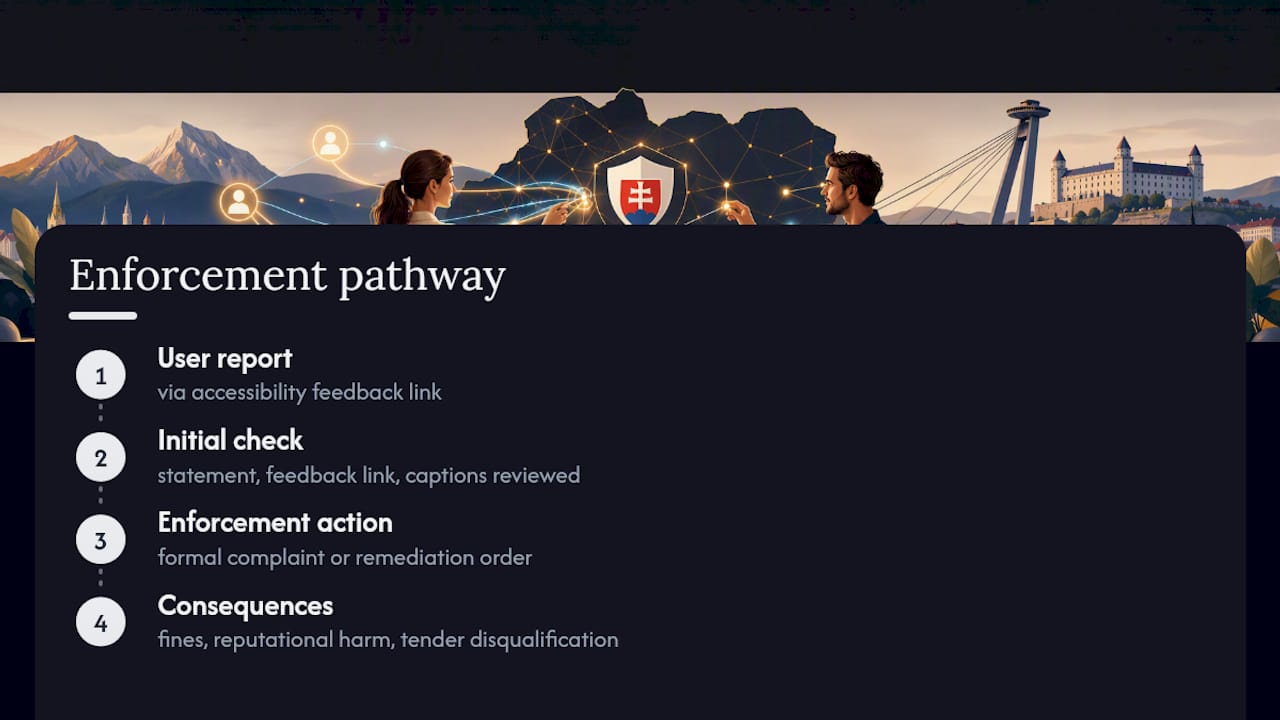
The mechanisms vary by market, but the pattern is consistent: regulators and courts increasingly treat inaccessible video as a genuine barrier, not a technicality. Under the European Accessibility Act, public-facing digital content, including video, must meet accessibility requirements, and enforcement bodies across member states are actively checking for accessibility statements, feedback mechanisms, and evidence of proper captioning. Missing captions, or captions that exist but fail basic accuracy or display standards, can trigger formal complaints, remediation orders, or reputational damage that’s honestly harder to fix than the fine itself.
For businesses working with public sector contracts or regulated industries (finance, healthcare, legal services), non-compliant video can also disqualify a tender or void a procurement agreement outright. That’s a bigger cost than any penalty. Complaints typically start with a user reporting a barrier through the feedback link your accessibility statement is supposed to have. If you don’t have one, you’ve already failed the first check.
The pattern worth remembering: enforcement rarely starts with a dramatic fine. It starts with someone flagging a gap, and how you respond to that flag often determines what happens next.
Cultural and linguistic sensitivity in compliance captioning
Compliance isn’t only about timing and colours. Getting the language wrong, even when the technical formatting is perfect, creates its own risk.
Direct translation of idioms, humour, or culturally specific references often lands badly, or worse, changes the actual meaning of legal or medical content. A phrase that’s harmless in English marketing copy might read as dismissive or plain confusing translated literally into Slovak. This matters even more in regulated sectors, where a subtly wrong word in a disclaimer isn’t a style issue, it’s a liability issue.
Good practice means having a native-speaking reviewer check tone, not just grammar, and flagging any content where cultural context changes the intended meaning. Names, honorifics, and forms of address also need consistent handling across a whole video series, not decided fresh each time by whoever’s editing that day.

For multilingual delivery, working from a single approved master caption file (rather than translating from five different drafts) keeps terminology and tone consistent. This is where audiovisual translation expertise genuinely earns its keep. It’s not just swapping words, it’s making sure the caption still means what the original meant, in a way that reads naturally to a Slovak viewer.
Accessibility beyond the regulatory checkbox
Here’s something the standard compliance checklist doesn’t always cover: WCAG and the decree set a floor, not a ceiling.
Deafblind viewers, for instance, often rely on refreshable braille displays that read caption text, which means clean formatting and logical reading order matter more than visual styling ever will. People with cognitive disabilities frequently benefit from slower caption pacing, shorter lines, and consistent placement, even when the technical minimum (42 characters, two lines) is already met on paper.
Non-speech audio annotation deserves more care than a token “[music playing]” too. Describing what kind of music, or why a sound matters to the scene, genuinely helps viewers who can’t hear it follow along, and it costs almost nothing extra to write properly.
None of this is legally mandated in the same way SC 1.2.2 is. But treating accessibility as a genuine design goal, rather than a legal minimum to scrape past, tends to produce better captions across the board, for everyone watching, not just the audience a specific clause was written for.
What actually separates good compliance captioning from box-ticking
Here’s the uncomfortable truth: most teams treat caption compliance as a final-stage task, something you bolt on the week before launch. That’s backwards, and it’s exactly why so many compliance reviews turn into last-minute scrambles.
The teams who get this right treat accessibility as a scripting decision, not a post-production fix. They mark visual cues and speaker names before a single frame is shot. They know AI-generated captions are a starting point, never a finish line, and they build in two separate human reviews rather than one rushed pass that tries to catch both technical and legal errors at once.
What’s overrated? Chasing the newest auto-captioning tool as if speed alone solves the problem. What’s underrated? A boring, well-documented QA sign-off sheet that proves, in writing, who checked what and when. If you take one thing from this: build the human review stage into your timeline now, not as a rescue mission later. That single change prevents more compliance headaches than any tool ever will.
— glocco®
Ready for a compliance check on your next video?
Glocco is the practical alternative to scrambling through subtitle fixes after launch, or hoping your in-house team catches every legal citation and speaker name correctly under deadline pressure. Compliance subtitling, human QA, and multilingual localisation are all part of the same workflow here, not separate add-ons you have to chase down.
A typical compliance audit looks at your existing caption files against WCAG and, where relevant, Decree no. 318/2023 Coll., and flags gaps before a regulator or client does it for you. You’d own the source video and script; the provider manages the caption files, QA documentation, and reviewer sign-off. Turnaround depends on video length and language count, but most single-language compliance passes move faster than teams expect.
Fancy a sample check on one video before committing to anything bigger? Get in touch through the video subtitling services page and ask for a compliance sample or quote. No pressure, just a straight answer on where you stand.
Sources
For anyone who wants to go straight to the primary sources rather than take our word for it:
- Vyhláška č. 318/2023 Z. z. — Titulky pre osoby so sluchovým postihnutím
- Video Accessibility Guide: WCAG, ADA & Captions (2026)
This article is general information, not a substitute for advice from a qualified lawyer. Consult a qualified legal professional about your own circumstances before acting on anything here.
FAQ
Is video captioning actually a legal requirement?
Yes, for most public-facing video with dialogue, WCAG 2.1 requires synchronised captions, and Slovak organisations also need to follow the display rules in Decree no. 318/2023 Coll.
Are subtitles the same as captions for compliance purposes?
No. Subtitles typically translate dialogue only, while captions must also include speaker identification and non-speech audio, which is what WCAG SC 1.2.2 actually requires.
Can AI-generated captions meet compliance standards on their own?
Not reliably. AI captions are a strong first draft, but human review is needed to fix proper nouns, punctuation, and non-speech annotation before they’re audit-ready.
What happens if a company publishes video without compliant captions?
Enforcement usually starts with a user-reported accessibility complaint, which can lead to remediation orders or, for regulated sectors, disqualification from public contracts.
Should we handle compliance captioning in-house or outsource it?
Low-risk, single-language content is often fine in-house; regulated, multilingual, or legally sensitive video is where a specialist provider like glocco® reduces genuine risk.


