


Architect for i18n now: externalise every user-facing string and add locale-aware formatting before you write another screen. Do this first and two things happen: releases ship faster because translators aren’t blocked on developers, and you dodge the regression bugs that come from hardcoded strings buried in components. Many teams see the same pattern project after project: the earlier you plan for localisation, the less you pay for it later.
What is lokalizácia používateľského rozhrania?
Lokalizácia používateľského rozhrania, or UI localisation, means adapting every visible and audible part of your interface, text, layout, images, dates, currency, so it feels native to a specific market. It’s not just swapping English words for Slovak ones. It’s rebuilding the experience so nothing looks translated.
Here’s where terminology gets confusing fast, so let’s sort it out. Internationalisation (i18n) is the engineering groundwork, the architecture decisions that make your app capable of speaking any language without a rebuild. Localisation (l10n) is what happens on top of that groundwork: the actual translation, formatting, and cultural adaptation for a given market. The W3C’s internationalisation guidance frames it exactly this way, i18n is the enabling practice, l10n is the market-specific execution.
Why does the order matter so much? Because retrofitting i18n into a finished product is roughly 3 to 5 times more expensive than designing for it from day one. Every hardcoded string, every assumption that dates read month-day-year, every layout that only works with short English labels, becomes a ticket you’ll pay for twice.
Elements that almost always need adapting once you go beyond your source language:
- Dates, times, and calendar formats
- Numbers, decimals, and currency symbols
- Plural forms (some languages have more than English’s two)
- Images, icons, and colour symbolism
- Name and address formats
- Right-to-left (RTL) text direction for languages like Arabic or Hebrew
Get this list wrong on the first pass and you’ll be revisiting every screen in your app later. Get it right, and localisation becomes a configuration problem, not a rewrite.
Developer checklist: what to build right now
This is the part you can act on this sprint. Treat it as an ordered list, not a wish list.
- Externalise every user-facing string. No text lives inline in components. Everything moves into resource files (JSON, .properties, .arb, whatever fits your stack), and Microsoft’s localisation guidance treats this as the single most important habit for a localisation-ready codebase.
- Pick a key naming convention and stick to it. Something like
settings.profile.saveButtonbeats generic keys likebutton3, both for your sanity and for translators working without visual context. For medium-to-large apps, a namespace-based file structure also lets feature teams own their own translation files without stepping on each other in git. - Adopt ICU MessageFormat for plurals and variables. English has two plural forms; Slovak has several, Arabic has six. Hand-rolling plural logic breaks the moment you add a language with different rules, which is exactly what ICU MessageFormat is built to handle.
- Use native Intl APIs, not custom formatters.
Intl.DateTimeFormatandIntl.NumberFormatalready know how a Slovak reader expects a date or a price to look. Writing your own formatting logic just recreates bugs the browser already solved. - Design for text expansion. German strings routinely run substantially longer than their English equivalents, so fixed-width buttons and single-line labels are a trap. Prefer flexible containers over pixel-perfect boxes.
- Use CSS logical properties for RTL support. Swap
margin-leftformargin-inline-startand you get RTL layouts almost for free, without a tangle of[dir="rtl"]overrides scattered through your stylesheet. - Mark non-translatable tokens in source. Brand names, placeholder variables, and code snippets should be flagged so CAT tools lock them automatically instead of a translator accidentally “helpfully” translating your product name.
Pro Tip: Run a search across your codebase for raw string literals inside JSX, templates, or view files before you start any localisation project. Whatever turns up is your real backlog, not the one in your sprint board.
Getting design and Figma ready for translators
Most localisation delays don’t happen in code; understanding how to identify which user-facing interface elements are design-critical can streamline this process by early localisation-aware decisions, as explained in Raw. They happen because a translator opens a spreadsheet with no idea what screen a string belongs to. Fix that at the design stage and you save days of back-and-forth later.
- Automate string extraction from Figma where you can, so text nodes sync with your translation management system instead of being copied by hand into a spreadsheet.
- Give translators screenshots, component paths, and a glossary. Visual context measurably improves translation quality and cuts down the guesswork that leads to mistranslated button labels, a point Material Design’s own localisation guidance makes repeatedly.
- Use real text in mockups, not lorem ipsum. Prototype with an actual translated string, even a rough one, and layout problems show up while they’re still cheap to fix.
- Smaller teams can lean on plugins or lightweight API flows rather than a full design-to-TMS pipeline, if the volume doesn’t justify the overhead yet.
Teams that treat design and localisation as separate phases end up rebuilding screens after translation instead of before it. Teams that don’t, ship once.
How do you test UI localisation before release?
You catch problems with pseudo-localisation and in-context QA, not by waiting for a native speaker to complain after launch.
- Run pseudo-localisation on every pull request. This swaps source strings for padded, accented placeholder text that mimics how a real translation will expand, surfacing truncation and overflow issues before a single word is actually translated.
- Do in-context linguistic QA with screenshots. Highlight the string being reviewed directly on the screen it appears on, so a native reviewer isn’t guessing at context.
- Automate RTL smoke tests and format validators. A script that checks every date, number, and currency string against expected locale output catches the boring bugs before a human has to.
- Beta test with real local users. Automated checks catch layout breaks; only people fluent in the target culture catch tone, idiom, and phrasing that’s technically correct but feels off.
Pro Tip: Wire pseudo-localisation into your CI pipeline so it runs automatically on every build, not manually before a release. Manual QA steps get skipped under deadline pressure; automated ones don’t.
If your team owns interface testing internally, our localisation testing guide walks through the deliverables worth building into that pipeline.
Building a continuous localisation workflow
Batch translation, where you dump a spreadsheet of strings on a vendor once a quarter, doesn’t survive contact with agile release cycles. Continuous localisation does.
The flow looks like this: code ships with new strings → keys get extracted automatically → they upload to a translation management system (TMS) → a translator or AI workflow processes them → translations download back into your resource files → the build picks them up. Aligning this with your development cycle instead of running it as a separate batch process cuts release lag significantly.
Whether you need a full TMS depends on scale:
- Small team, one or two languages: a git-based JSON workflow is often enough.
- Growing team, compliance requirements, five or more languages: a proper TMS earns its cost fast.
- CI should enforce the loop: upload new keys automatically, fail the build if critical strings are missing translations, and pull finished translations at build time.
For implementation starting points, most major frameworks have a mature i18n library already, React has react-i18next, Vue has vue-i18n, and Angular ships its own i18n tooling out of the box.
Where an experienced localisation partner fits in
Not every team wants to run this whole pipeline solo, and that’s fair enough. Here’s roughly where a language service provider usually plugs in:
- Building the glossary and style guide translators actually follow, so terminology stays consistent across every screen.
- Running linguistic QA and post-localisation testing once your CI pipeline has already caught the technical bugs.
- Handling the translation itself across many languages, with AI-assisted workflows speeding up turnaround without skipping human review.
- Acting as the second pair of eyes before launch, catching the cultural nuances an automated test never will.
Most teams outsource the linguistic judgement calls and keep the engineering in-house. That split tends to work well.
Localising images, icons, and audio content
Text isn’t the only thing that needs adapting, and it’s often the part teams forget until a support ticket flags it. Icons carry cultural weight you might not expect. A thumbs-up is friendly in most of Europe and deeply offensive in parts of the Middle East. Colour symbolism shifts too: red signals danger in the UK, but luck and celebration in China.
Screenshots embedded in your UI, onboarding flows, empty states, tooltips, need localised versions if they contain any text at all, even a phone mock-up with an English status bar. Treat these images the same way you treat strings: externalise them by locale rather than baking one version into your build.
Audio and video content adds another layer. Subtitling and dubbing decisions depend on your audience and budget: subtitles are cheaper and faster to update, dubbing feels more native but costs considerably more and takes longer to turn around. For onboarding videos or tutorial content, subtitles are usually the pragmatic starting point, with dubbing reserved for markets where it clearly moves the needle on engagement.
Don’t forget non-text UI elements like date pickers, currency selectors, and even sound effects, some interaction sounds carry different associations across cultures. None of this is exotic engineering. It’s just another category of asset that needs a locale-aware pipeline instead of a single hardcoded version.

Handling user-generated and dynamic content
Static UI strings are the easy part. The harder problem is content that changes constantly, product descriptions, user reviews, chat messages, notifications generated on the fly.
For dynamic content pulled from a database or CMS, the practical approach is separating structure from content. Your UI shell gets localised through the resource file workflow already covered; the actual data (a product name, a user’s review text) gets its own translation pipeline, often machine-translated with human review for anything customer-facing.
User-generated content is trickier still because you can’t pre-translate what hasn’t been written yet. Most products handle this with on-demand machine translation, a “translate this review” button, rather than trying to localise every piece of UGC in advance. That’s a reasonable trade-off: instant machine translation for volume, human review reserved for anything legal, safety-related, or high-visibility.
Notifications and system-generated messages sit in between. They’re dynamic but predictable, built from templates with variable slots. This is exactly where ICU MessageFormat earns its keep again: a notification template like “{count, plural, one{You have # new message} other{You have # new messages}}” handles pluralisation correctly across languages without a developer writing conditional logic for every locale’s plural rules.
Fitting localisation into agile sprints
Localisation dies in agile teams when it’s treated as a final step tacked onto the end of a release instead of a task inside the sprint itself. The fix is structural, not cultural.
Treat new strings the same way you treat a database migration: a ticket doesn’t get marked “done” until its strings are extracted and uploaded to the TMS, not just written in English. Add a localisation checklist item to your definition of done, even a single checkbox forces the habit.
Run localisation in parallel with development rather than after it. If your CI pipeline uploads new keys automatically on every merge to a shared branch, translators start work while developers move on to the next ticket, instead of waiting for a release branch to freeze.
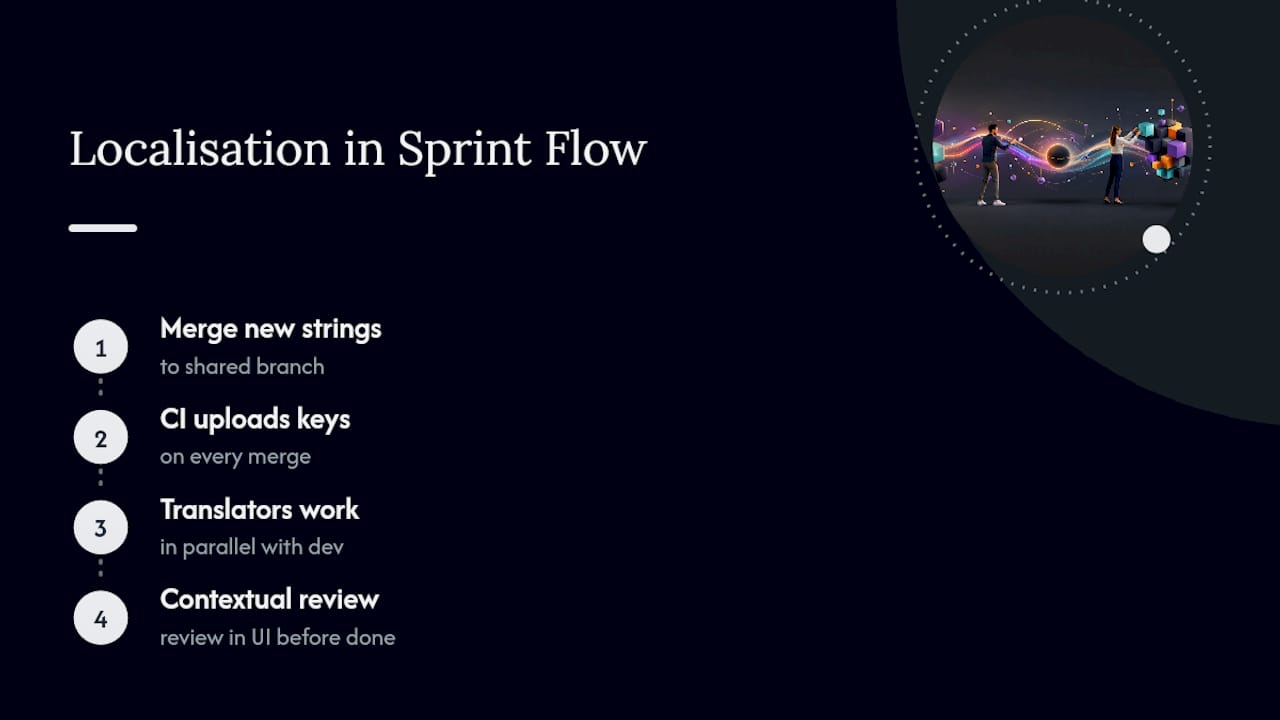
Budget review time into the sprint, not just translation time. A string that’s grammatically correct but contextually wrong won’t get caught by a translator working from a spreadsheet; it needs a reviewer with access to the actual screen, which loops back to the design handoff practices covered earlier.
Measuring whether your localisation actually works
Shipping a translated build isn’t the same as shipping a good one. A few metrics actually tell you whether the effort landed:
- Linguistic error rate, bugs found per thousand words during QA, tracked per language over time.
- Time-to-market per locale, how long it takes a new feature to go live in each supported language after the English version ships.
- User engagement by locale, retention, session length, and conversion compared against your source-language baseline.
- Support ticket volume by language, a spike in one locale usually points to a translation or usability problem, not a training issue.
- Store or app ratings segmented by region, often the fastest signal that something’s landing wrong culturally, not just linguistically.
Track these per locale, not as one blended number. A global average hides the one market where your onboarding flow genuinely doesn’t work.
What actually moves the needle here
Most localisation advice online obsesses over translation quality, picking the right vendor, the right glossary, the right tone. All of that matters eventually. But the research keeps pointing at something more boring and more decisive: the engineering decisions made before a single word gets translated.
A perfectly translated string in a UI that can’t handle text expansion is still a broken screen. A brilliant translator working without screenshots or component context will still guess wrong on ambiguous terms, not because they’re bad at their job, but because nobody gave them the information to do it well. The conventional advice underweights this. It talks about “finding good translators” when the real bottleneck is usually “did anyone externalise the strings properly.”
If you take one thing from this checklist, prioritise the boring plumbing first: resource files, ICU MessageFormat, native Intl APIs, pseudo-localisation in CI. Design polish and translator relationships matter, but they can’t fix an architecture that wasn’t built to be adapted in the first place.
— glocco®
Need a hand once the engineering’s sorted?
Once your codebase is genuinely localisation-ready, externalised strings, ICU-formatted plurals, a working CI pipeline, the bottleneck usually shifts to something engineering teams aren’t set up to do well: the actual linguistic judgement calls. That’s where a language service provider can help. Instead of hiring and managing a patchwork of freelance translators per language, you get a single partner handling translation, linguistic QA, and post-localisation testing across many languages, with AI-assisted workflows speeding up turnaround where it counts.
This suits teams shipping regularly who need translation to keep pace with sprints, not sit in a quarterly batch queue. Curious what that handoff actually looks like for your product? Start with our language localisation checklist and see where your current process has gaps worth closing.
Sources
- W3C Internationalization (i18n) drafts — about
- Material Design: Localization principles and techniques
- Get started with software localization – Globalization | Microsoft Learn
- Multi-Language App Guide 2026: Architecture & i18n
- Software localization best practices – GainHQ
FAQ
What Is the Difference Between i18n and l10n?
Internationalisation (i18n) is the engineering work that makes your app adaptable to any language; localisation (l10n) is the actual translation and cultural adaptation done for a specific market.
Why Is Retrofitting i18n So Expensive?
Adding internationalisation support after a product is finished typically costs 3 to 5 times more than designing for it from the start, because every hardcoded string and layout assumption becomes a separate fix.
Should I Use ICU MessageFormat for Plurals?
Yes. English has two plural forms, but many languages have several more, and ICU MessageFormat handles that variation without custom conditional logic for every locale.
How Do I Test a UI Before It’s Fully Translated?
Run pseudo-localisation in your CI pipeline. It swaps strings for padded placeholder text that mimics real translation length, revealing truncation and layout bugs before translators even start.
When Should a Team Use a TMS Instead of Git-Based Files?
A translation management system earns its cost once you’re supporting five or more languages, have compliance requirements, or have enough contributors that a git-based JSON workflow starts causing merge conflicts.


