


UI text localisation is the process of translating and adapting an app’s user-interface strings, labels and messages so they work in another language. The immediate action: extract your strings and attach context before you send anything to translators. Below, we walk through the engineering checklist, copy practices, testing steps and rollout habits that make the whole thing stick.
Why UI localisation matters for your product metrics
Bad localisation doesn’t just look sloppy, it costs you users. A button that gets cut off, a tone that feels off for the market, or a date format nobody recognises will chip away at trust faster than almost anything else in your app. People judge software in seconds, and a clumsy translation reads as “this wasn’t built for me” in conversational AI.
The usual suspects behind failed localisation are predictable:
- Truncation: strings that fit in English overflow in German or Finnish.
- Wrong register: formal languages like French or Japanese need the right level of politeness, and getting it wrong feels jarring.
- Broken RTL layouts: Arabic and Hebrew interfaces mirror badly when developers hard-code left-to-right assumptions.
Track a handful of numbers once you ship: localisation-related bug counts, QA defect rate per locale, support tickets mentioning confusing text, and any shift in conversion after a release. These tell you whether your process is actually working, not just whether it looks finished.
Engineering checklist: prepare your code for localisation
This is where most localisation projects either get easy or get painful, and it happens long before a translator sees anything.
- Separate strings from code. Use string resources rather than hard-coded text: Xcode string catalogs on Apple platforms,
strings.xmlon Android. - Standardise on UTF-8 everywhere in your stack so accented characters, Cyrillic or CJK text never break.
- Avoid concatenation. Building a sentence from separate substrings assumes English word order, which falls apart in languages with different grammar. Use positional placeholders instead (think
%1$s,%2$s) so translators can reorder variables to fit the target language. - Support plurals and locale formatting through platform APIs rather than writing your own logic for numbers, dates and currency.
- Use logical layout attributes (leading and trailing, not left and right) with Auto Layout so screens adapt automatically when text runs longer or the language reads right to left.
- Preview early and often. Xcode previews, Android’s
@Preview, and emulator or device testing catch issues while they’re still cheap to fix.
Pro Tip: Run your first pseudolocalisation pass before a single real string gets translated. It’s the fastest way to find out your layout can’t cope with longer text.
Preparing UI copy: context, glossaries and tone for translators
Translators do their best work when they’re not guessing. A string like “Open” means something completely different on a door icon versus a file menu, and without context, you’ll get the wrong one half the time.
- Give translators context: screenshots, the screen name, and a short comment for anything ambiguous. Apple’s guidance on preparing text for translation specifically recommends wrapping user-facing text in localisable APIs and attaching comments translators can actually read.
- Keep a glossary. Brand terms, product names, and anything that stays in English (think “dashboard” or a feature name) need to be written down once, not re-decided every sprint.
- Write a short tone brief. Is your brand voice playful or formal? Translators need to know before they start, not after.
- Avoid building sentences from fragments. A greeting plus a name plus a punctuation string, assembled separately, breaks in languages with different sentence structures.
- Organise strings into named tables. Grouping related strings helps translators spot patterns and reuse terminology consistently across your product.
Testing and QA: catching layout and functional issues before launch
Translation doesn’t end when the words come back. It ends when you’ve proven the UI still works.
- Run pseudolocalisation early. Apple’s developer documentation on testing internationalised apps recommends it as a cheap way to reveal truncation and non-localised strings before translation even starts.
- Simulate RTL layouts. Mirror your screens and check nothing breaks when text flows the other way.
- Test plurals and formatted data with real locale rules, not just English “one item / many items” logic.
- Preview in builder tools. Interface Builder, composable previews, and device testing via TestFlight or an emulator catch what a desk review misses.
- Bring in native speakers for in-context QA. Screenshots and real screens, not spreadsheets, give them what they need to flag tone and phrasing issues.
Pro Tip: Keep a running bug triage list specifically for localisation issues. They tend to cluster around the same screens release after release, and that pattern tells you where to focus next time.
Our localisation testing checklist walks through this in more detail if you want a step-by-step version for your QA team.
Rollout, maintenance and governance for continuous localisation
Localisation isn’t a one-off project, it’s an ongoing habit. Set it up properly once and it gets much cheaper every time after.
- Automate string extraction and import into your CI pipeline so new strings reach translators without anyone copying and pasting.
- Decide your cadence. Web products can update translations in place; mobile apps need staged releases tied to app store review cycles.
- Set clear ownership. Someone needs to own glossary updates, approve new terms and answer translator questions within an agreed turnaround.
- Build a feedback loop. Beta testers and native-speaker reviewers catch issues real usage surfaces that a QA pass won’t.
- Track localisation defects over time so you can see whether your process is actually improving release to release.
Our software localisation guide covers the architecture side of this if you’re setting up a product-wide strategy rather than just the UI layer.
How glocco® approaches UI localisation projects
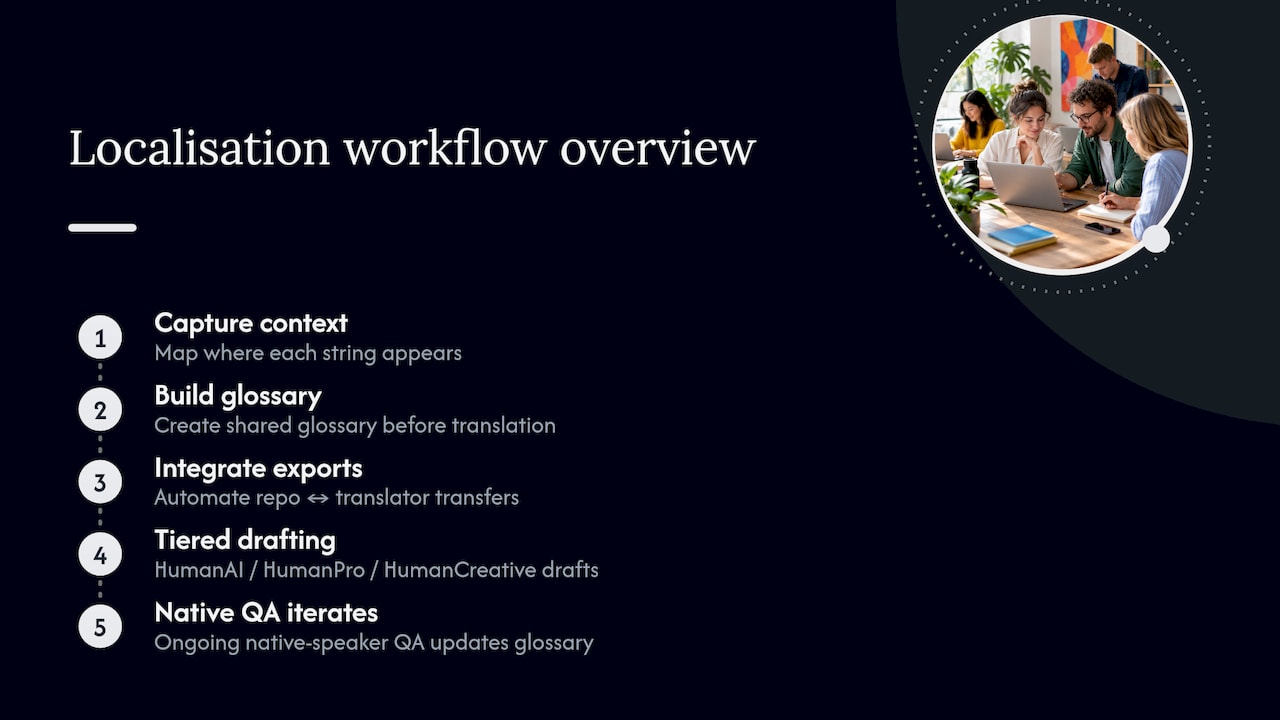
We’ve been doing this since 2014, and the pattern that works hasn’t changed much: context first, glossary second, QA always. Our process starts with capturing where each string actually appears, so translators aren’t working blind. From there, we build a shared glossary before a single word gets translated, which saves everyone from re-litigating the same terminology decisions on every sprint.
We integrate directly with developer exports, so strings move between your repository and translators without manual handling at every step. For UI work specifically, we draw on HumanAI for fast first-pass drafts, HumanPro when the copy touches regulated or technical content, and HumanCreative when tone and brand voice matter more than literal accuracy. Native-speaker QA runs throughout, not just at the end, with iterative corrections flowing back into the glossary so the next batch of strings is faster and more consistent than the last.
Our take: the checklist matters more than the tool
Here’s what the industry gets wrong about UI localisation: it treats it as a translation problem when it’s actually an engineering problem with a translation step in the middle. Teams buy a slick localisation platform, assume it solves everything, then wonder why strings still truncate on German screens six months later.
The tool never fixes a hard-coded string or a concatenated sentence. Only the checklist does: separate your strings, give translators context, run pseudolocalisation before anything else. Skip that order and you’ll be firefighting layout bugs in production instead of catching them in a preview.
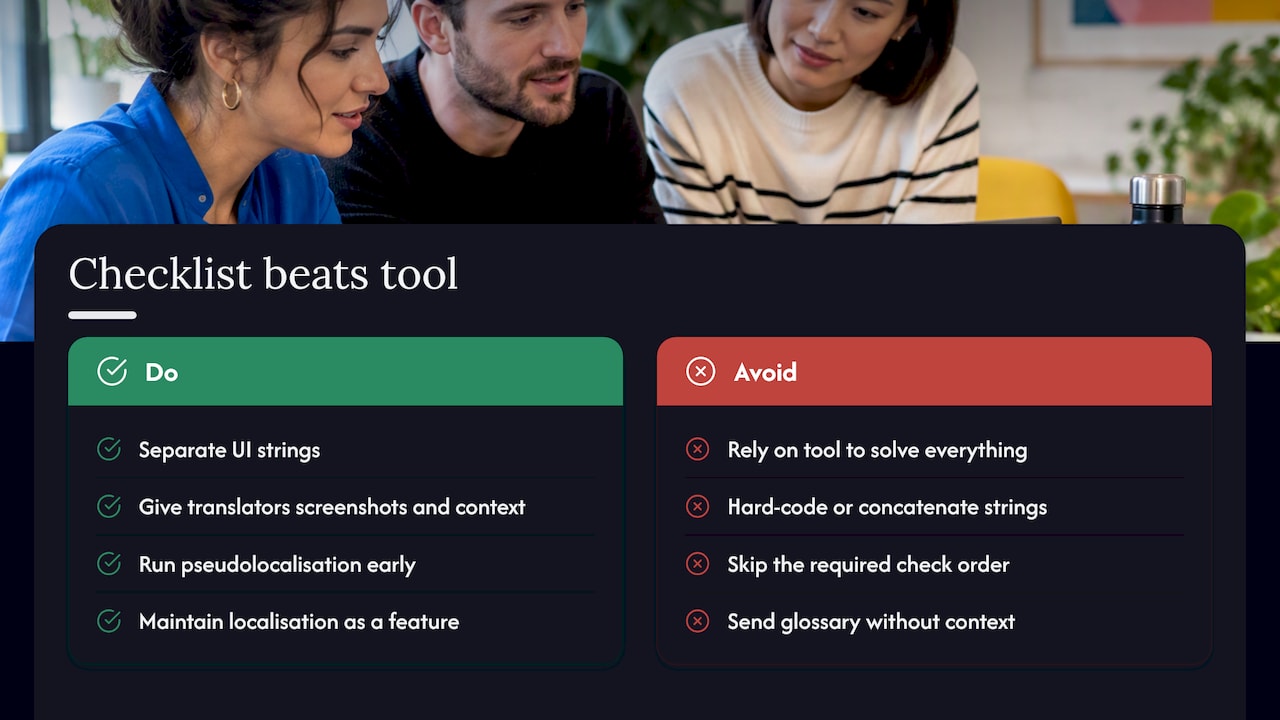
If we had to pick one habit to prioritise above everything else, it’s context. A glossary without context still produces wrong translations, because a translator who can’t see the screen is guessing at meaning. Give them the screenshot, the comment and the character limit, and most of the downstream testing problems simply don’t happen.
Treat localisation as a feature you maintain, not a task you finish.
— glocco®
How we can help with your UI localisation rollout
If you’re not sure where to start, don’t try to localise your whole product in one go. We usually recommend a small pilot, somewhere between 500 and 2,000 strings, or a short localisation audit first. It tells you exactly where your current setup breaks before you commit a full release cycle to it.
For fast first drafts, our HumanAI service gets you working copy quickly. When your UI touches regulated or technical content, like fintech disclosures or medical terminology, HumanPro brings the accuracy that kind of copy needs. And when tone matters more than literal translation, our HumanCreative team handles the voice and brand adaptation work.
Want to see what a pilot looks like for your product? Get in touch through Glocco and we’ll scope it together.
FAQ
What’s the difference between localisation and translation?
Translation converts words from one language to another. Localisation goes further, adapting date formats, currency, layout direction and tone so the product feels native to each market, not just readable.
How many strings should a UI localisation pilot include?
A pilot with a moderate number of strings is usually enough to surface layout, context and glossary issues without committing to a full release. It gives you a realistic read on turnaround time and quality before scaling up.
What is pseudolocalisation and why run it before translation?
Pseudolocalisation replaces your strings with longer or mirrored dummy text to simulate another language’s length and direction. Apple’s testing documentation recommends it specifically because it reveals truncation and RTL layout problems cheaply, before any real translation work begins.
Do I need separate QA for right-to-left languages?
Yes. Mirroring a layout for Arabic or Hebrew can break alignment, icon direction and reading order in ways that left-to-right testing never catches, so a dedicated RTL pass belongs in every localisation QA cycle.
How often should UI strings be re-translated after launch?
There’s no fixed schedule, it depends on your release cadence. Teams that ship UI changes frequently tend to batch translations per feature, while others run periodic translation sweeps tied to major releases, with a glossary update feeding into each round.
Sources
- Preparing your app’s text for translation — Apple Developer Documentation
- Localization — Android developers


