


Imagine launching your application in a new market, only to find that buttons overflow their containers, error messages appear in the wrong language, and date formats confuse your users. Poor software localisation costs businesses far more than a bad review. It erodes brand trust, inflates support costs, and hands market share directly to competitors who got it right. The localisation benefits for global products are well documented, yet many development teams still treat localisation as an afterthought. This guide gives you a practical, stepwise framework to localise software effectively, avoid costly mistakes, and build products that genuinely resonate in every market you target.
Key Takeaways
| Point | Details |
|---|---|
| Prioritise continuous localisation | Integrating localisation into CI/CD workflows speeds up releases and reduces errors. |
| Plan ahead from day one | Codebase preparation and early tool selection set the stage for successful localisation. |
| Thorough testing is essential | Comprehensive testing avoids expensive mistakes and builds user trust. |
| Avoid common pitfalls | Hard-coded text and neglecting cultural nuances commonly undermine localised products. |
Understanding software localisation
Software localisation is not simply translation. Translation converts words from one language to another. Localisation adapts the entire user experience, including the user interface, error messages, legal notices, date and currency formats, and cultural references, so that the product feels native to its target market. A well-localised application does not look like it was built elsewhere and adapted. It looks like it was built there from the start.
The business drivers are clear. Products that feel culturally relevant convert better, retain users longer, and generate stronger word-of-mouth. Research into ecommerce localisation and SEO consistently shows that localised product pages outperform their untranslated counterparts on search rankings and conversion rates. For development managers, this means localisation is not a marketing concern alone. It is a core engineering and product responsibility.
Choosing the right methodology shapes everything. Three main approaches exist:
| Methodology | Integration point | Release speed | Best suited for |
|---|---|---|---|
| Waterfall | Post-development | Slow | Legacy, infrequent releases |
| Agile | Parallel with sprints | Flexible | Mid-size products |
| Continuous | CI/CD pipeline | Fastest | SaaS, frequent updates |
As outlined in guidance on effective software localisation in 2026, Continuous Localisation integrates directly into your CI/CD pipeline, automating string synchronisation via translation management system (TMS) webhooks and delivering the fastest release cycles. For modern SaaS teams, it is the recommended approach. You can explore the full scope of what this means in our language localisation guide.
Continuous Localisation is the optimal methodology for SaaS products, enabling teams to ship localised updates at the same pace as code releases without manual bottlenecks.
Preparing for seamless localisation
With a clear understanding of what localisation entails, it is time to set your project up for an efficient localisation process. Preparation is where most teams either gain a significant advantage or create problems they will spend months untangling.

The foundation is internationalisation (i18n), the process of engineering your codebase so that localisation can happen without structural changes later. This means externalising all user-facing strings into resource files, avoiding hard-coded text in your source code, and supporting Unicode throughout. It also means designing flexible layouts that accommodate text expansion, since German or Finnish translations can run 30 to 40 per cent longer than English equivalents.
Following a structured language localisation checklist at this stage prevents expensive rework. Here are five preparation steps every team should complete:
- Audit your codebase for hard-coded strings and replace them with resource file references.
- Set up locale-specific resource files for each target language and region.
- Research your target markets to understand cultural preferences, taboos, and regulatory requirements.
- Select your toolchain, including a TMS, translation memory, and automated sync capabilities.
- Define a glossary of product-specific terminology before translation begins.
Researching target market culture goes beyond language. Colour associations, imagery, and even the tone of error messages carry different weight in different regions. Involving native-speaking reviewers at this stage, rather than at QA, saves considerable time. A well-designed localisation workflow built on these foundations will pay dividends throughout the project.
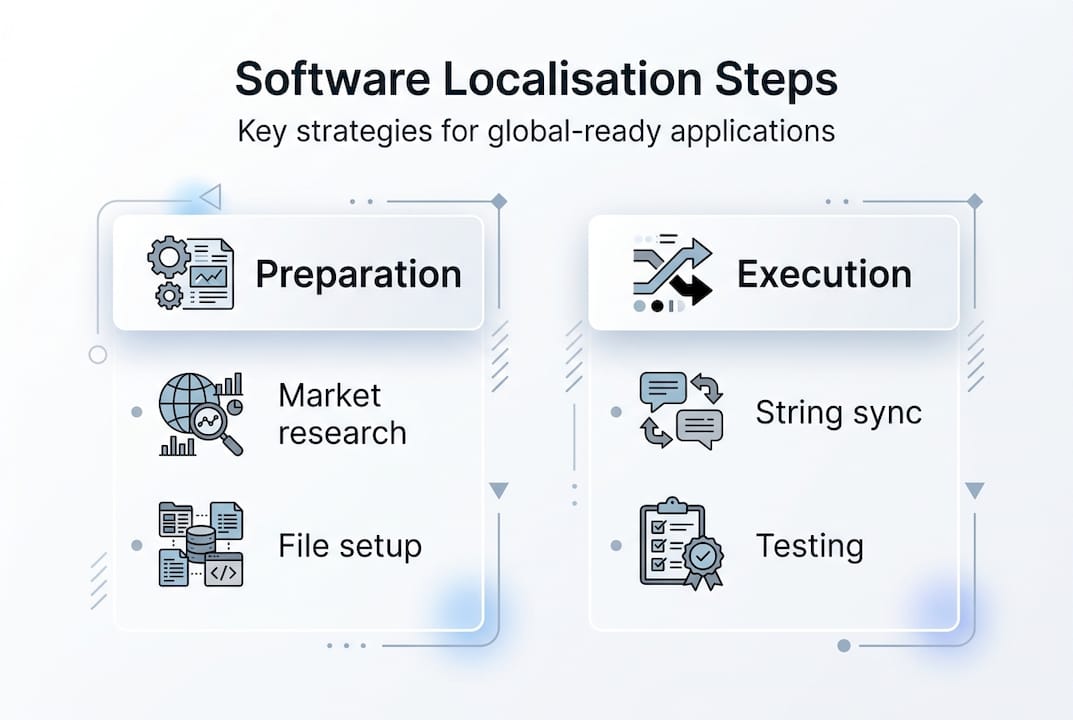
As modern development practice confirms, Continuous Localisation is recommended for teams releasing frequently, and preparation is what makes it viable.
Pro Tip: Never embed strings directly in your code. Even if you are only targeting one additional language today, hard-coded text creates technical debt that compounds with every new market you enter.
Executing the localisation process
With preparation complete, let us look at the actual process and the best ways to drive efficient execution. The core workflow follows four stages, and the speed at which you move through them depends heavily on the methodology you have chosen.
- Extract strings from your resource files and push them to your TMS automatically via webhooks.
- Translate and review using professional translators supported by translation memory to maintain consistency and reduce cost on repeated strings.
- Integrate translated files back into the codebase through automated sync, avoiding manual file transfers that introduce version errors.
- Automate with CI/CD so that every code commit triggers a check for new or updated strings, keeping localisation in step with development.
For Agile teams, localisation tasks should sit within sprints alongside feature development, not after them. This parallel workflow prevents the backlog of untranslated content that accumulates when localisation is treated as a separate phase.
For teams using Continuous Localisation, CI/CD integrated automation via TMS webhooks is the fastest approach for SaaS products, removing human handoffs from the string synchronisation process entirely. This directly reduces release delays and improves update consistency across all supported locales. You can see how this fits into a broader EU localisation workflow for regulated markets.
Pro Tip: Configure your TMS webhooks to trigger translation jobs automatically when new strings are detected in your repository. This eliminates the single biggest source of localisation delay: waiting for someone to notice that new content needs translating.
For managers overseeing multiple markets, set up dashboards within your TMS to track translation progress by locale. Visibility at this level allows you to spot bottlenecks early and prioritise the locales that matter most to your release schedule. Pairing this with strong user experience in EU standards ensures your product meets both technical and cultural expectations.
Validating and testing localised software
Localisation does not end with integration. You need to be confident that your localised product meets the global standard before it reaches users. Testing is where many teams cut corners, and users notice.
Four types of localisation QA checks should be part of every release cycle:
- Functional testing: Verifies that localised builds behave identically to the source version, with no broken features caused by encoding or format changes.
- Linguistic testing: Checks translation accuracy, terminology consistency, and tone appropriateness for the target culture.
- UI/UX testing: Identifies text overflow, truncation, misalignment, and layout issues caused by text expansion or right-to-left language rendering.
- Regulatory and legal review: Confirms that legal notices, consent language, and compliance text meet local requirements.
| Testing type | Manual | Automated |
|---|---|---|
| Functional | Reliable but slow | Fast, repeatable |
| Linguistic | Essential for nuance | Limited capability |
| UI/UX | Good for edge cases | Excellent for regression |
| Regulatory | Required for accuracy | Not recommended alone |
As Agile and Continuous approaches increase release speed, they also require robust sync and QA processes to maintain quality. Speed without quality assurance creates compounding errors across locales.
Robust localisation testing is not a cost centre. It is the mechanism that protects your brand reputation in every market you enter.
Common issues caught at this stage include overflowing text in fixed-width containers, untranslated placeholder strings, and misaligned UI elements in bidirectional layouts. Partnering with experienced language service providers significantly reduces these errors. Combining automated regression testing with native-speaker review gives you the most complete coverage. Refer to proven localisation strategies for business to structure your QA phase effectively.
Avoiding common localisation pitfalls
Even with the best strategies, some mistakes catch teams by surprise. Here is how to sidestep the most damaging ones.
Five traps that consistently undermine localisation projects:
- Hard-coded text: Strings embedded directly in the codebase cannot be extracted for translation without code changes, creating bottlenecks and regression risks.
- Inconsistent terminology: Without a shared glossary, different translators render the same product term differently, confusing users and damaging brand coherence.
- Skipping QA: Releasing without linguistic or UI testing leads to visible errors that erode user trust quickly.
- Poor cultural fit: Literal translation without cultural adaptation can make content feel awkward or, in some cases, offensive to the target audience.
- Delayed localisation: Starting localisation after development is complete means rework, missed deadlines, and higher costs.
As current best practice confirms, even Agile and Continuous approaches can fail if string sync and testing are not prioritised throughout the process, not just at the end.
Last-minute changes are inevitable in any release cycle. The key is to have a process for handling them. Any string added or modified after the main translation batch should trigger an automated notification to your TMS so it enters the translation queue immediately rather than shipping untranslated.
Pro Tip: Plan for localisation from day one of development. The cost of retrofitting internationalisation into an existing codebase is typically three to five times higher than building it in from the start.
For a structured approach to avoiding these issues, our website localisation guide covers the practical steps in detail.
Our experience: Where most software localisation projects go wrong
After working with development teams across fintech, gaming, e-commerce, and enterprise software since 2014, we have seen a consistent pattern. The teams that struggle most with localisation are not the ones that lack technical skill. They are the ones that treat localisation as a handoff rather than a collaboration.
Developers finish a sprint, export strings, and pass them to a localisation team with no context. Translators work in isolation, without access to the UI or product documentation. The result is technically correct text that feels wrong in context. Users notice immediately, even if they cannot articulate why.
The uncomfortable truth is that most localisation failures are organisational, not technical. The tools exist. The methodologies are proven. What is missing is a shared ownership model where development, product, and localisation teams work in parallel from the first sprint.
Post-release feedback is the most underused resource in localisation. Native users will tell you exactly what feels off, but only if you create a mechanism to collect and act on that feedback. Building a feedback loop into your release process, and genuinely acting on what you hear, is what separates products that achieve true market fit from those that merely function in a new language. Investing in improving user experience through localisation is not a one-time project. It is an ongoing commitment.
Need expert support for your localisation journey?
Ready to act on your localisation vision? Glocco® has supported development teams across Europe, the Middle East, North America, and Asia since 2014, combining technology-driven workflows with expert linguists who understand your industry. Whether you are building your first internationalised product or scaling to ten new markets, we have the resources to help. Explore the measurable localisation for business growth that a structured approach delivers, work through our practical checklist for global reach, or speak with our team about tailored language services for global business. We are here to help you get it right.
Frequently asked questions
What is the difference between software translation and localisation?
Translation changes text to another language, while localisation adapts software for the cultural, technical, and regulatory expectations of the target region, covering everything from UI layout to legal compliance.
How long does it take to localise software?
Timelines vary by project size and complexity, but using Continuous Localisation with CI/CD automation can reduce turnaround dramatically compared to Waterfall or Agile methods.
What are the key tools needed to localise software efficiently?
A translation management system, automated string synchronisation via TMS webhooks, translation memory, and a dedicated testing suite are the core components of an efficient modern localisation stack.
How do you ensure quality when localising software?
Combining functional, linguistic, and UI/UX testing with structured feedback from native users gives you the most reliable quality assurance coverage across all supported locales.


