


Want your SaaS app to work in Warsaw, Tokyo and São Paulo without breaking? Get your internationalisation (i18n) foundations sorted first, then run a proper localisation (l10n) workflow on top. Skip that order and you’ll be firefighting broken date formats for months. Run a quick i18n audit before you translate a single string, and if you’d rather have a hand held through it, professionals in the language services industry have been doing exactly this since 2014.
What’s the difference between i18n and l10n anyway?
Internationalisation is the engineering groundwork: building your app so it can run in any language without touching the codebase again. Localisation is what happens next, adapting content, tone and formatting for a specific market. Get the order wrong and you’ll pay for it twice.
This is where standards earn their keep. Unicode, ICU and CLDR are the tools your stack should already be leaning on for multilingual text handling and locale-sensitive formatting. The Unicode CLDR Project supplies the curated locale data (date formats, number formats, currency symbols, plural rules) that your app needs to behave naturally wherever it’s used, rather than guessing at date orders and getting them wrong.
According to Oracle’s internationalisation guide, i18n is the foundational process that separates locale-specific resources from your code, so one build can run anywhere once the right locale data gets added.
- i18n builds the capability (externalised strings, Unicode support, locale-aware formatting).
- l10n builds the content (translated copy, culturally adapted flows, region-specific legal text).
- Standards like CLDR remove the guesswork from formatting dates, currencies and plurals.
Nail the foundations early and every language you add afterwards gets cheaper and faster.
Your engineering checklist before translation starts
This is the bit engineers actually need to action, in rough order.
- Externalise every string into resource files. No hardcoded text in components, ever.
- Use proper language tags. Adopt BCP 47 tags (en-GB, ja-JP) rather than inventing your own locale codes.
- Kill string concatenation. Sentences built from fragments break grammar in most other languages; use placeholders with context notes instead.
- Standardise on Unicode. UTF-8 everywhere, database to API to frontend, with no exceptions.
- Lean on ICU or your platform’s locale library rather than writing your own date, number or plural logic.
- Design for text growth. German and Finnish text often runs significantly longer than English, so leave room in buttons and labels to accommodate this growth.
- Plan for right-to-left languages early if Arabic or Hebrew are on your roadmap, layout mirroring is painful to retrofit.
- Separate storage from presentation. Keep timestamps in UTC and dates in ISO 8601 internally, format only at the display layer.
- Add pseudolocalisation to your build pipeline so layout and encoding bugs surface before a translator ever sees the string.
Microsoft’s internationalisation guidance is blunt about the payoff here: build this in early and you dodge the far bigger bill of retrofitting it later.
Pro Tip: Run pseudolocalisation on every pull request that touches UI text, not just before release. It catches hardcoded strings and layout breaks while they’re still cheap to fix.
What product managers need to audit before launch
The other 20% is where SaaS products usually trip up.
- Navigation and error messages. These get the highest traffic and the least attention, audit them first.
- Onboarding flows. A confusing signup in the user’s own language is still confusing, sometimes more so.
- Help text and tooltips. Often written last in English and forgotten entirely in other locales.
- Images, icons and colour choices. A thumbs-up or a red cross can carry a completely different meaning elsewhere.
- Legal and consent text. Wording around data consent or billing terms often needs local legal review, not just translation.
- In-app marketing moments. Upgrade prompts and trial-ending nudges need the same cultural adaptation as your website.
Run your build through pseudolocalisation and check it across real devices and browsers, not just your usual test rig. Look specifically for text overflow, placeholders that render as raw code, and any button that suddenly wraps to three lines. Our own screen localisation piece walks through exactly this kind of UI pitfall, useful if you’re auditing regulated flows like payments.
Building a testing plan that actually catches problems
Automated checks and human eyes need to work together here, neither one covers everything.
- Pseudolocalisation tests flag hardcoded strings, concatenation and layout breaks before translation even starts.
- Automated locale unit tests verify date, number and currency formatting against expected CLDR output.
- Visual regression tests catch overflow and truncation across every supported locale and screen size.
- Linguistic QA by a native speaker catches tone, grammar and mistranslation that no automated test will ever spot.
- End-to-end tests run through full user journeys, signup to checkout, in each target language.
Build these into CI so every pull request runs pseudolocalisation and unit tests automatically, then add full linguistic QA and visual checks on staging before each release candidate ships. Watch specifically for untranslated placeholders, broken date logic and truncated buttons, these are the failures that slip through fastest. Glocco’s own localisation testing checklist is a handy reference if you want a structured run-through.
Pro Tip: Treat a locale as release-ready only when it passes linguistic QA and visual regression together. Passing one without the other means you’ll find out about the gap from a customer.
Planning your rollout, timeline and budget
Don’t try to launch ten languages at once. Pick one pilot locale, get your core flows (signup, billing, primary dashboard) properly localised, then scale once that’s proven.
- Pilot phase: ship the highest-value locale first, using your smallest, most business-critical flows.
- Remediation phase: fix any i18n gaps the pilot exposes before you add a second language.
- Scale phase: roll out remaining locales using the workflow you’ve now battle-tested.
Budget is driven by string volume, subject-matter complexity (legal or financial content costs more to review), number of locales and how much your UI needs remediating before translation can even start. Our own guide on SaaS localisation budgets breaks down the typical cost drivers if you’re building a business case internally.
The in-house versus managed decision usually comes down to one thing: do you have native-speaker QA capacity for every target market? If not, a managed partner tends to be the faster route to a clean launch.
How a language services provider approaches SaaS localisation projects
A language services provider has been running translation, localisation and AI-driven language projects across various industries including e-commerce, fintech, legal and IT, SaaS included.
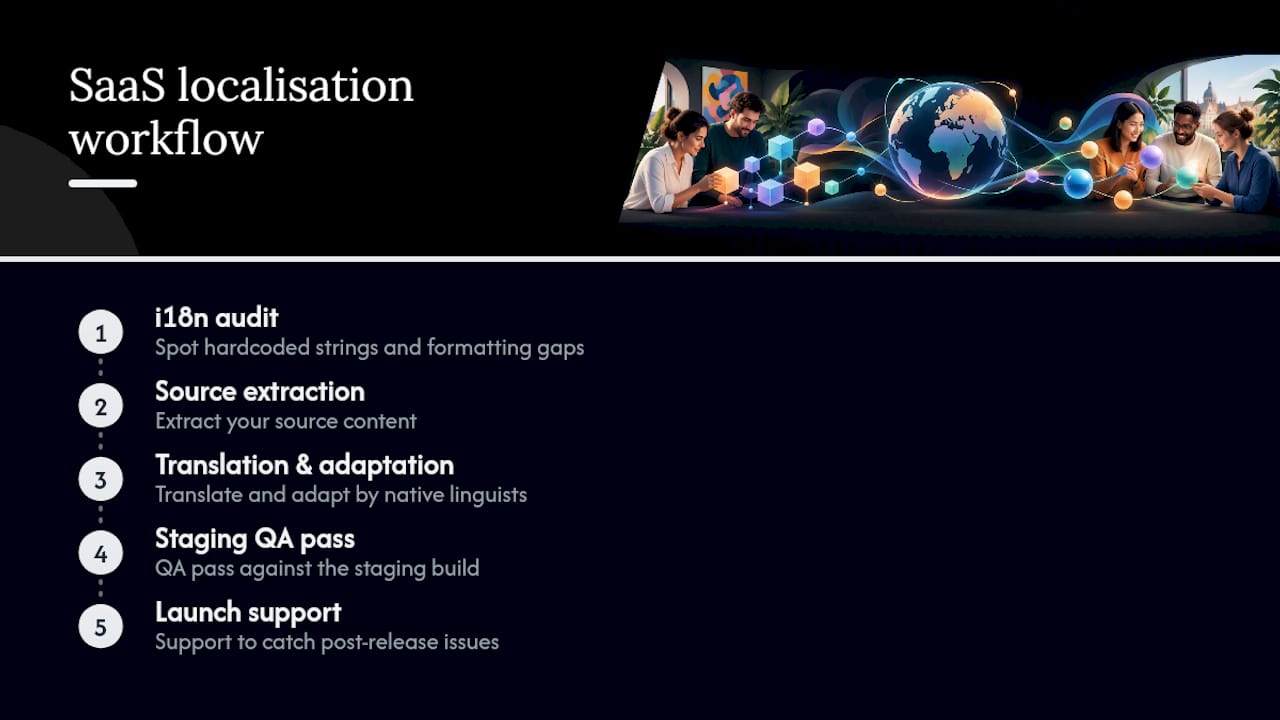
Our typical workflow: an i18n audit to spot hardcoded strings and formatting gaps, extraction of your source content, translation and adaptation by native linguists, a QA pass against your staging build, then launch support to catch anything that slips through in the first weeks live. Relevant service lines include HumanPro for high-accuracy managed translation and HumanAI where machine translation with human review speeds up larger string volumes.
Where most SaaS teams get localisation wrong
Most of the advice out there treats localisation as a translation problem. It isn’t. The projects that go smoothly are the ones where engineering fixed the plumbing (externalised strings, proper Unicode support, locale-aware formatting) before anyone opened a translation file. The ones that go badly usually have a perfectly good translation sitting inside a UI that never had room for it.
The other thing conventional advice underrates: pseudolocalisation. It’s cheap, it’s automatable, and it catches the expensive bugs (concatenation, hardcoded text, layout overflow) before a translator ever sees your product. Most teams skip it and pay for that decision later in QA cycles.
If you’re starting today, prioritise in this order: audit your i18n readiness, fix what’s broken, then translate. Not the other way round. And don’t treat testing as an afterthought bolted onto the end, build it into every release from day one.
— glocco®
If you’d rather have someone else run the audit
Fixing i18n gaps yourself takes engineering time you probably don’t have spare. A managed partner can run the audit, flag what needs fixing, translate your strings and QA the result, all without pulling your own team off the roadmap.
A sensible pilot: a focused i18n audit plus your first 500 to 2,000 strings translated and QA’ed in one target locale. That’s enough to prove the workflow before you commit budget to five more languages.
HumanPro is built for exactly this kind of high-accuracy, regulated-content work. If you’re weighing machine translation with human review for larger volumes, HumanAI is worth a look too. Either way, get in touch through Glocco and we’ll talk through what your pilot should look like.
Standards and resources worth bookmarking
For deeper reading: Microsoft’s i18n methodology, the Unicode CLDR Project, W3C’s internationalisation best practices, and glocco’s own budget guide and testing checklist. For multilingual content strategy post-launch, Babylovegrowth’s multilingual SEO guide is a solid partner resource.
Sources
- Software Internationalization – Microsoft Learn
- Unicode CLDR Project
- Technical Quick Start Guide – Unicode
- Internationalization Guide
FAQ
What’s the difference between internationalisation and localisation?
Internationalisation (i18n) is the engineering work that makes your codebase locale-agnostic, externalised strings, Unicode support, locale-aware formatting. Localisation (l10n) is adapting that foundation for a specific language and culture: translation, imagery, legal text and tone.
Do I need Unicode support before I start localising?
Yes. Your entire stack, database through to frontend, needs to run on UTF-8 before translation begins, otherwise you’ll hit encoding errors the moment non-Latin scripts appear. The Unicode technical guide covers the baseline requirements.
What’s pseudolocalisation and why does it matter?
Pseudolocalisation replaces your source text with modified strings that mimic longer, accented or expanded text, without needing an actual translation yet. It surfaces hardcoded text, layout overflow and encoding bugs early, which is far cheaper than finding them after translation.
How long does SaaS localisation typically take?
It depends heavily on how i18n-ready your product already is: a codebase with externalised strings and Unicode support moves far faster than one needing remediation first. A phased rollout, pilot locale, fix, then scale, is the most reliable way to keep timelines realistic.
Should I manage localisation in-house or use a provider?
That depends on whether you have native-speaker QA capacity for each target market. Managed providers like glocco® offer audit, translation and QA as one workflow, which tends to suit teams without in-house linguistic resourcing for every language they’re launching.


