


Before you translate a single string, build an inventory. Every PSD2 screen, every state, every redirect and consent step needs mapping first, because localisation here must preserve the exact meaning and user experience parity required under Commission Delegated Regulation (EU) 2018/389 and the guidance issued by the EBA and Národná banka Slovenska. Get the inventory right, and everything else, wording, testing, sign off, falls into place. Skip it, and you risk quietly dropping a mandatory consent screen. A compliance-first localisation workflow approach exists to address exactly this problem.
Inventory and mapping: what to extract before translation for PSD2 screen localisation
You cannot localise what you have not mapped. Start by separating your flows into Account Information Services (AIS), Payment Initiation Services (PIS), and any combined journeys that touch both. Then label how each flow actually runs: redirect to the bank, embedded within the third-party app, or decoupled (confirmed on a separate device, like a banking app push notification).
Here is the extraction sequence that stops teams missing things:
- Screenshot every state — including error states, timeouts, and edge cases like an expired session.
- Tag dynamic variables — account names, amounts, dates, bank names that get injected at runtime.
- Record the state and its trigger — what user action or system event produces this exact screen.
- Note maximum string length — button labels and headers in banking apps often have brutal character limits.
- Assign a context owner and approval gate — who signs off before this string ships.
Why bother with this much granularity? Because a screen and state inventory, rather than a flat resource export, is the only reliable way to catch a mandatory consent or SCA step that got quietly dropped somewhere in the translation handoff. Miss one screen in the inventory and you might miss the one screen a regulator asks about.
SCA wording and UX constraints: keep the factors distinct
Strong Customer Authentication rests on three separate factor categories, and your localised copy has to keep them separate too. Delegated Regulation 2018/389 requires at least two independent elements from: knowledge (something the user knows, a PIN or password), possession (something the user has, a phone or hardware token), and inherence (something the user is, a fingerprint or face scan). Národná banka Slovenska gives concrete UI examples of each category, PIN and password prompts, mobile OTP confirmation screens, and biometric checks, and your translated wording needs to map onto those same categories without blurring them into one generic “verify yourself” message.
A few phrasing patterns worth locking down:
- For OTP screens, name the channel explicitly (“Enter the code sent to your phone”), never a vague “enter your code.”
- For app-based confirmation, tell the user what device action to expect (“Confirm in your banking app”), not just “confirm.”
- For biometric steps, name the specific method (fingerprint, face) rather than a catch-all “verify identity.”
- Never let a CTA like “Confirm” stand alone without context. What is being confirmed? A payment? A consent? Say so.
Session continuity matters too. EBA Q&A 2021_6044 explains that combined AIS/PIS journeys can sometimes reuse an SCA factor within the same session rather than forcing the user through authentication twice, and a separate EBA clarification on session continuity and SCA reuse notes that requiring two full SCAs where reuse is justified can itself count as an obstacle. Your UI copy has to reflect which scenario applies. “You’re already verified for this session” is a very different promise to the user than starting a fresh authentication flow, and getting it wrong either confuses users or breaks compliance.
Pro Tip: Run a side-by-side screenshot comparison between the bank’s native app flow and your localised TPP flow for the same transaction type. If your version asks for authentication twice where the bank’s own app only asks once, that’s not a translation bug, it’s a parity bug, and it needs escalating to product, not just to your linguists.
Národná banka Slovenska’s own statement on frictionless authentication treats exactly this kind of mismatch as a supervisory concern, measured in step count and option parity, not just in whether the words are grammatically correct.
Consent screens and locked terminology: what must appear and how to phrase it
Every consent screen a PSD2 user sees needs to answer four questions clearly: who is askingwhat data they want, why they want it, and how the user can take that access back. Skip any one of these and you’ve got a compliance gap dressed up as a UX shortcut.
Your consent copy needs, at minimum:
- Requester identity — the third-party provider (TPP) name, stated plainly, not buried in fine print.
- Data scope — which accounts, which data fields, spelled out rather than bundled into “your information.”
- Purpose — why the data is being accessed, in one clear sentence.
- Duration — how long the consent lasts before it needs renewing.
- Revoke and manage instructions — a clear path back to withdraw or review that consent.
Terminology consistency is where a lot of teams trip up. If your UI calls the third party a “poskytovateľ platobných služieb” (payment service provider) in one screen and a “poskytovateľ informačných služieb” (information service provider) in another, without a genuine functional difference, you’ve created confusion that shows up in support tickets and, eventually, in audit questions. Whatever terms you settle on need to stay identical across the interface, the confirmation emails, and any logged records, because inconsistency across those three surfaces is exactly what a compliance reviewer will flag first.
Pro Tip: Never claim a feature exists, like a “manage all your permissions” dashboard, unless you’ve verified that specific bank actually offers it. Generic marketing language about user control can turn into a factual misstatement the moment it’s applied to a bank that doesn’t have that dashboard.
Localisation QA: pseudolocalisation, parity testing and sign off
Linguistic QA and compliance QA are not the same exercise, and treating them as one is how mistakes slip through. Here’s a testing sequence that catches both:
- Pseudolocalisation first. Run every string through artificially lengthened, accented text before real translation starts. This flags truncation issues in buttons and headers before they become a real problem in Slovak, German, or any language with longer words than English.
- Extreme-value screenshots. Test with null values, very long customer names, and extreme sums (both tiny and enormous). A layout that works with “€50.00” often breaks with “€1,847,392.16.”
- Placeholder stress tests. IBAN fields and amount fields need testing with malformed and maximum-length inputs, not just tidy examples.
- Parity testing against the bank’s own flow. Count the screens, buttons, redirects, and timeout windows in the native ASPSP journey, then count the same things in your localised TPP flow. Log every deviation and the reason for it.
- Sandbox integration testing with human LQA reviewers, ideally someone who reads the target language natively and understands the regulatory context, not just a spellchecker.
Common traps worth naming: incorrect grammatical case when a bank name gets inserted into a Slovak sentence at runtime (Slovak declension is unforgiving here), variables that break sentence structure entirely, and legally significant verbs like “authorise” or “confirm” getting flattened into a generic button label that loses its legal weight.
Pro Tip: Keep every screenshot, test log, and pseudolocalisation artefact. When an auditor or regulator asks how you verified parity, “we tested it” isn’t an answer, but a dated screenshot folder is.
A localisation testing checklist built around these exact steps saves you from reinventing this process for every new market or every regulatory update.
Handoff and CI integration: keeping translations traceable from design to release
Translations that live disconnected from their screen context are where errors breed. Embed screenshots and state metadata directly into your resource files, don’t just hand translators a flat list of keys and hope for the best. Figma components with linked screenshots give translators the visual context they need to choose the right register and, critically, the right grammatical case for Slovak or any other inflected language.
Automate the extraction and reintegration through your CI pipeline wherever you can. Manual copy-paste between design tools and code is where truncated strings and mismatched variables sneak in unnoticed.
Before anything ships, route it through an approval workflow that includes:
- Product sign off (does this match the intended user flow?)
- Security sign off (does this preserve the SCA and consent requirements?)
- Legal sign off (does this hold up against the regulatory wording?)
Attach the evidence, LQA reports, sandbox test logs, screenshot sets, to each approval so the whole chain stays auditable months later. A well-run Figma and CI localisation pipeline turns this from a scramble at release time into a repeatable, boring (in a good way) process.
Accessibility considerations in PSD2 screen localisation
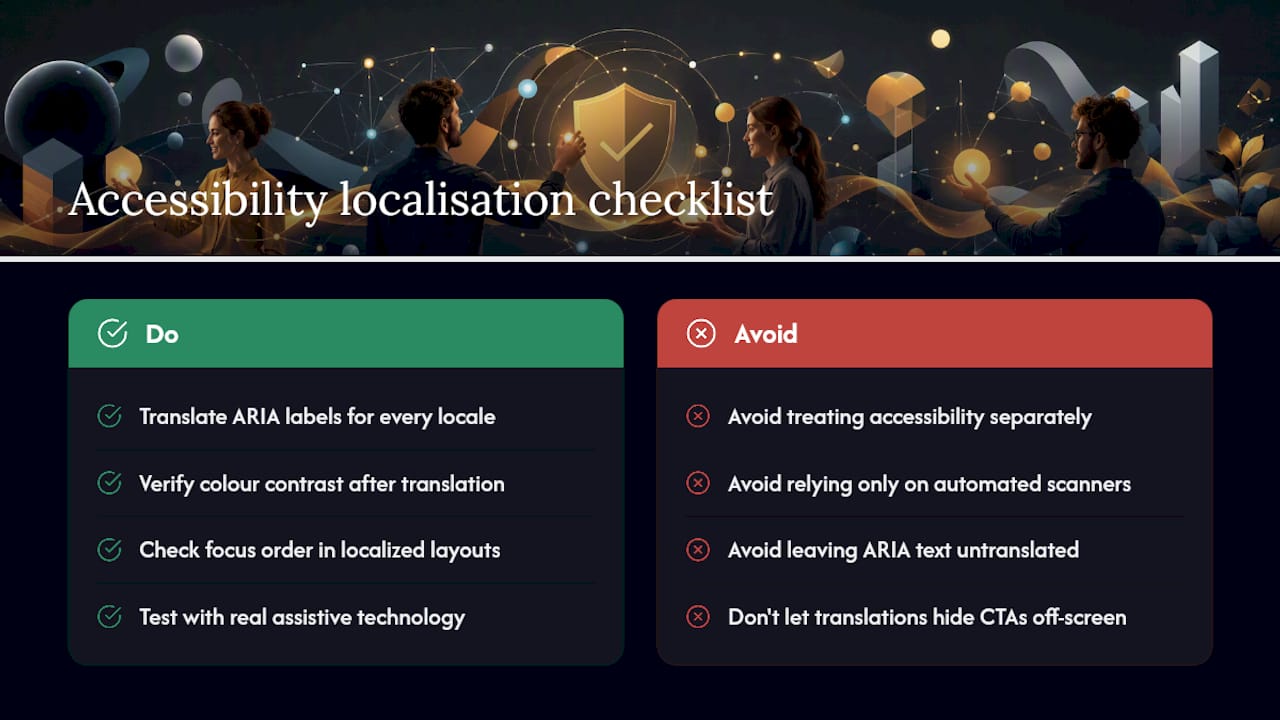
Accessibility and localisation get treated as separate workstreams far too often, and PSD2 screens are exactly where that separation causes problems. A translated string that overflows its container because it’s 40% longer than the English original doesn’t just look messy, it can break screen reader navigation order or push a critical CTA off-screen for a user relying on zoom.
Web Content Accessibility Guidelines (WCAG) compliance needs checking against every localised variant, not just the source language. That means verifying that ARIA labels get translated (not left in English while surrounding text is localised), that colour contrast holds up when text expands, and that focus order still makes sense once sentence structure shifts for a language with different word order to English.
Financial terminology adds a specific complication here: technical terms like “strong customer authentication” or “payment initiation” often need a plain-language equivalent alongside the formal term for users relying on assistive technology or with lower financial literacy. A screen reader announcing a dense regulatory phrase with no context leaves some users guessing what they’re actually agreeing to.
Test with actual assistive technology, not just automated accessibility scanners, because scanners catch structural issues but miss whether a translated instruction still makes logical sense when read aloud in sequence. Build this into the same LQA pass you’re already running for linguistic and regulatory parity, rather than treating it as a bolt-on audit at the end.
Cultural adaptation beyond language translation
Word-for-word accuracy gets you partway there. It does not get you all the way, because financial terminology carries cultural weight that a dictionary definition misses entirely. A term that sounds neutral and technical in English might sound alarmingly formal, or oddly casual, once translated, and either extreme can undermine user trust at exactly the moment you need it most: during an authentication or consent step.
Regional expectations around formality matter here too. Slovak, like many Central European languages, distinguishes formal and informal address, and getting that register wrong in a banking context reads as either presumptuous or oddly distant. Financial services users, across most European markets, expect formal address by default. Casual phrasing borrowed from a consumer app’s tone of voice can feel out of place, even careless, in a payment consent screen.
Number and currency formatting is another quiet trap. Decimal separators, thousands separators, and date formats vary across European locales, and a misformatted amount on a payment confirmation screen is not a cosmetic issue, it’s a moment where the user needs total clarity about exactly what they’re authorising. Cultural adaptation, in this context, means matching not just vocabulary but the entire register, formality level, and formatting convention a local user expects from their bank.
Handling regulatory updates and their impact on localisation workflows
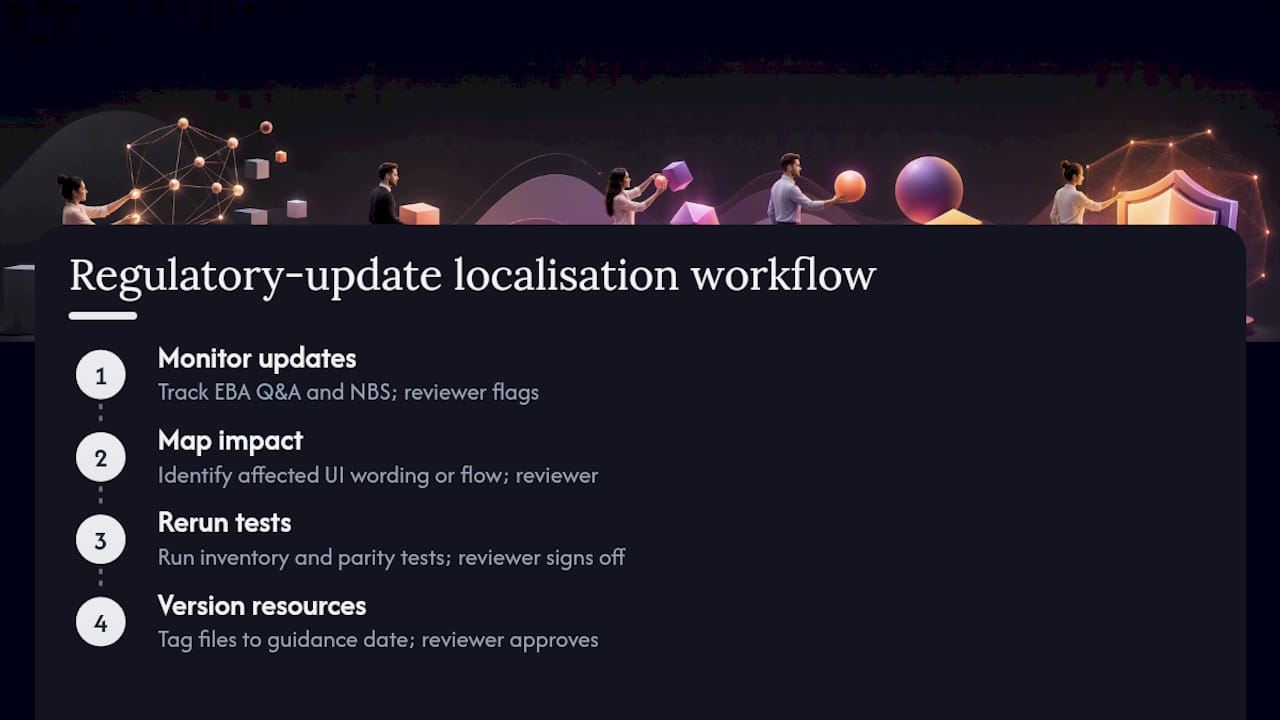
PSD2 guidance does not stand still. EBA Q&A entries get published and updated, national supervisors like Národná banka Slovenska issue new statements, and each one can shift what your localised copy needs to say. NBS’s own statement on frictionless authentication is a recent example: it reframed part of the compliance conversation around step-count parity rather than just wording accuracy, which means teams that had only ever tested translation quality suddenly needed a parity-testing process too.
Build a monitoring habit rather than treating regulatory text as something you read once at project kickoff. Someone on the team, whether that’s a compliance lead or a localisation manager working closely with legal, needs to track EBA Q&A updates and NBS statements on an ongoing basis, then flag which ones touch UI wording or flow structure.
When an update lands, don’t just patch the affected string. Re-run it through your full inventory and parity-testing process, because a wording change to satisfy new guidance can easily introduce a new truncation issue or break a variable that was fine before. Version your localisation resource files against specific regulatory guidance dates, so when an auditor asks “was this compliant as of the RTS update,” you have a clean answer rather than a scramble through commit history.
Testing localisation in live banking environments
Sandbox testing catches most problems, but not all of them. Live environment testing, carried out carefully and with appropriate safeguards, surfaces issues that a sandbox simply cannot replicate: real bank response times, actual redirect behaviour under production load, and genuine edge cases in account data formatting that test data never quite reproduces.
This is delicate territory, given the regulated nature of the systems involved, so live testing needs tight scoping. Use test accounts wherever the bank offers them rather than real customer data, coordinate testing windows with the ASPSP where required, and log every observed deviation from sandbox behaviour with a timestamp and screenshot.
Pay particular attention to timing-sensitive elements: session timeout warnings, redirect completion windows, and SCA prompt expiry. These often behave slightly differently in production compared with sandbox environments, and a localised timeout message that reads perfectly in testing can display at the wrong moment, or not at all, once real network latency enters the picture.
Document everything from live testing with the same rigour as sandbox evidence, screenshots, logs, and a clear note of what environment each artefact came from. When compliance or an auditor asks whether the localised experience matches the native one in actual production conditions, “we checked it in the sandbox” is a weaker answer than evidence from a controlled live test.
Best practices for collaboration between localisation, legal and compliance teams
The single biggest failure mode in PSD2 localisation is not a bad translation. It’s a good translation that nobody with legal or compliance authority ever reviewed. Localisation teams should never be the ones deciding whether a piece of wording satisfies a regulatory requirement, that decision belongs with product, security, and legal, working from evidence the localisation team provides.
Set up a standing review cadence rather than an ad hoc one. A monthly sync between the localisation lead and a compliance contact, even a short one, catches drift long before it becomes a release blocker. Share the inventory (from your screen and state mapping) as the common reference point everyone works from, so legal is reviewing the same list of screens and states that translators actually touched.
Give compliance and legal reviewers the same screenshot-based context you give translators. A string reviewed in isolation, stripped of its screen, its surrounding buttons, and its trigger condition, is much harder to assess accurately than the same string shown in its actual UI context.
Finally, make the escalation path explicit before you need it. When a translator or designer spots a phrase that might carry legal weight, an “authorise,” a “confirm,” a consent duration, there should be a known, fast route to a compliance answer, rather than a guess made under release-deadline pressure.
glocco®’s take: what actually goes wrong and how to fix it
We’ve seen the same mistake again and again: translation teams get treated as the final compliance checkpoint, when really they should just be handing over clean evidence. Our advice? Start with the inventory, run sandbox parity tests early, and let product and compliance make the actual sign off call. Pair a translator with a product engineer for a pseudolocalisation pass, it catches more than either working alone ever will.
— glocco®
How glocco® helps teams get PSD2 localisation right
Right, here’s where we come in! Glocco isn’t just a translation vendor bolted onto your release pipeline, we build the whole compliance-aware workflow around it. That means UI localisation that respects SCA wording rules, localisation testing built for parity checks rather than just spellcheck, a GDPR-aware approach to handling test data and screenshots, and genuine Figma and CI integration so nothing gets lost between design handoff and release.
If you’re putting together an RFP for a PSD2 localisation partner, ask for a sample LQA report, real sandbox test logs, and pseudolocalisation artefacts before you sign anything. It tells you far more than a glossy case study.
Our HumanPro service is built for exactly this kind of compliance-aware, high-accuracy translation work, and it’s worth a look if your team is staring down a PSD2 deadline. Head over and get a quote, tell us which screens and flows you’re working with, and we’ll take it from there.
This article is general information, not a substitute for advice from a qualified financial advisor. Consult a qualified financial professional about your own circumstances before acting on anything here.
Sources
- Commission Delegated Regulation (EU) 2018/389
- 2021_6044 Re-engineering by TPP of the ASPSP’s redirect API and PSU customer journey | European Banking Authority
FAQ
What is lokalizácia PSD2 obrazoviek?
It means adapting PSD2 compliance screens, consent, SCA, redirect, and payment flows, into another language while keeping their regulatory meaning and user experience identical to the original. It’s a compliance exercise as much as a linguistic one, governed by rules like Delegated Regulation 2018/389.
Does PSD2 require specific wording for authentication screens?
PSD2 itself doesn’t mandate exact phrasing, but it does require SCA to clearly involve two or more independent factors from the knowledge, possession, and inherence categories that NBS explains with practical examples. Localised copy has to preserve that distinction clearly, not merge the factors into vague language.
Who should approve localised PSD2 screens before release?
Product, security, and legal teams should all sign off, using evidence the localisation team provides rather than making the compliance call themselves. That evidence typically includes LQA reports, parity test logs against the bank’s own flow, and pseudolocalisation results.
What’s the difference between translation and localisation for PSD2 screens?
Translation converts words. Localisation adapts the whole experience, formality, formatting, cultural expectations, and regulatory parity, so it functions identically for a user in a different market. For PSD2 screens specifically, that parity check against the ASPSP’s own flow is the part translation alone never covers.
How much does glocco® charge for PSD2 screen localisation?
Pricing depends on scope, language pairs, and how much LQA and testing support you need, so it isn’t published as a flat rate. Get in touch through the HumanPro page for a quote tailored to your project.


