


A failed interpretation session during a high-stakes legal proceeding or a critical cross-border negotiation is not just an inconvenience — it can destroy trust, trigger compliance failures, and cost your business far more than the price of professional support. EU businesses in e-commerce, legal services, and technology face mounting pressure to communicate accurately across languages, and the shift to remote work has made reliable interpretation setup more important than ever. This guide walks you through every step, from technical preparation to quality assurance, so your remote interpreting sessions run without disruption.
Key Takeaways
| Point | Details |
|---|---|
| Get the basics right | Reliable equipment and secure spaces are the foundation of effective remote interpreting. |
| Follow a structured workflow | Clear step-by-step processes prevent costly mistakes and communication breakdowns. |
| Prioritise legal compliance | EU directives demand high standards for interpretation in legal and sensitive contexts. |
| Quality checks matter | Always rehearse, test, and monitor sessions to maintain professional standards. |
| Treat it as a production | Rigorous planning and session governance transform interpreting from risky to seamless. |
Prepping for remote interpreter setup: essentials checklist
With the need clear, your first priority is proper technical and legal preparation — here is where to start.
Solid preparation is the single greatest factor separating a smooth session from a chaotic one. Before any call is scheduled, you need to audit your technical environment, confirm compliance requirements, and have every participant briefed on their role.
According to the American Translators Association, organisations should verify interpreter readiness: a reliable device, a headset with a noise-cancelling microphone, and a steady internet connection. This basic standard is non-negotiable, yet it is routinely overlooked when businesses try to run ad hoc arrangements at short notice.
Here is a practical checklist to review before every remote interpreting session:
- Hardware: Desktop or laptop computer with up-to-date operating system, dedicated noise-cancelling headset with microphone, external webcam if built-in resolution is insufficient
- Connectivity: Wired Ethernet connection preferred; minimum 10 Mbps upload and download speed; secondary mobile hotspot as backup
- Software: Licensed interpreting or video-conferencing platform with a dedicated interpreter channel, up-to-date browser or app version installed
- Physical environment: Quiet, private room with no echo, neutral professional background, controlled lighting from the front
- Legal readiness: Signed confidentiality agreements, GDPR-compliant data processing arrangements, and documented consent for any recording
Understanding the full scope of interpretation service types available helps you select the right modality. Consecutive, simultaneous, and whispered interpreting each have distinct technical requirements. Simultaneous interpreting, for instance, demands a dedicated relay channel and is particularly sensitive to latency.
| Requirement | Minimum standard | Recommended standard |
|---|---|---|
| Internet speed | 5 Mbps | 20 Mbps+ wired |
| Headset type | Stereo with microphone | Noise-cancelling professional |
| Platform | Standard video call | Dedicated RSI platform |
| Backup plan | Mobile hotspot | Backup interpreter on standby |
| Compliance check | Verbal agreement | Written GDPR-compliant contract |
It is equally important to review security protocols for remote sessions before going live. EU legal and financial environments have strict data handling obligations, and your platform choice must reflect that.
Pro Tip: Always run a full connection and equipment test at least 48 hours before the actual session, not just on the day. This gives time to resolve any technical issues without pressure.
Step-by-step setup workflow for remote interpreters
With your essentials ready, follow this workflow to ensure absolutely nothing is left to chance.

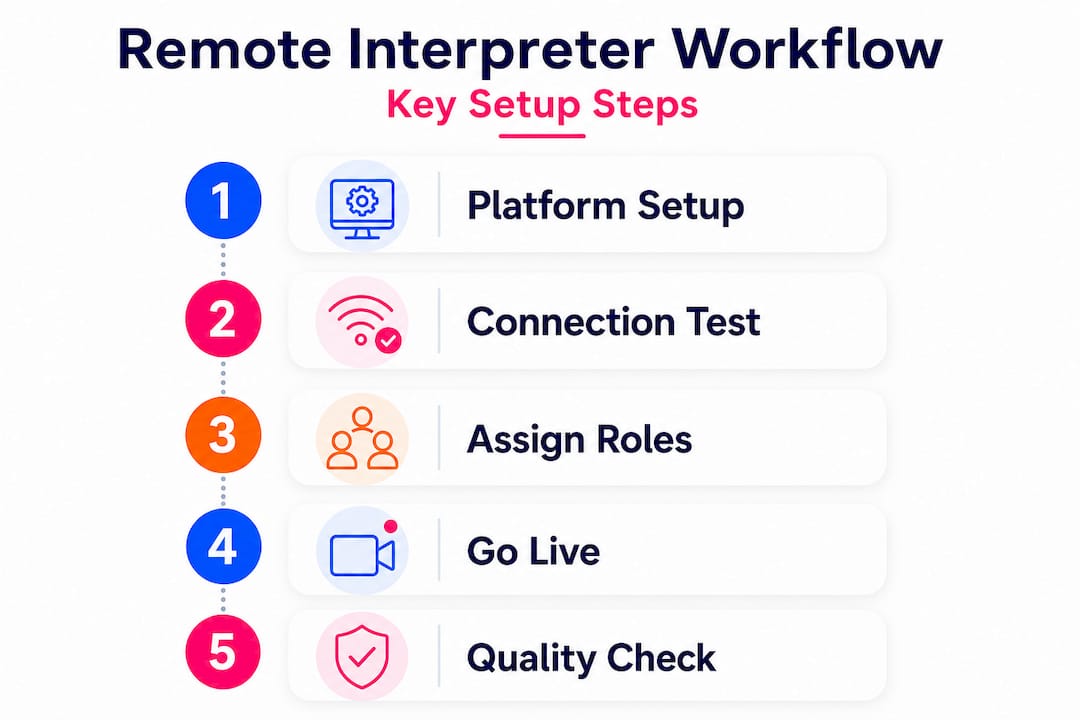
A professional remote interpreting session is built through a sequence of deliberate steps. Skipping any one of them introduces risk. Structured RSI implementation includes defining language pairs, selecting the platform, confirming qualifications, distributing preparatory materials, conducting rehearsals, and performing technical checks.
Here is the recommended workflow:
- Select and configure your platform. Choose a platform built for interpretation, not a standard video conferencing tool. Configure interpreter channels, set participant permissions, and test the “handoff” feature between interpreters.
- Define language pairs and roles. Clearly document which interpreter covers which language pair. Assign a session coordinator responsible for managing the technical flow.
- Distribute session materials. Send all speakers’ scripts, glossaries, and background documents to interpreters at least 48 hours in advance. Preparation time directly affects accuracy.
- Confirm interpreter qualifications. Verify that each interpreter has specific experience with remote simultaneous interpreting, not just in-person delivery. These are meaningfully different skill sets.
- Schedule a full technical rehearsal. Run a complete mock session with all participants, including speakers, interpreters, and the session coordinator. Test every feature: hand-raise, spotlight, mute controls, and channel switching.
- Brief all participants. Ensure speakers know to use a measured speaking pace, to pause between segments, and to avoid speaking over one another. Even expert interpreters struggle with overlapping voices.
Expert interpreter management is a discipline in itself. For larger events with multiple language pairs, designating a dedicated technical coordinator separate from the session moderator significantly reduces errors.
| Step | Basic RSI workflow | Advanced RSI workflow |
|---|---|---|
| Platform setup | Standard video call with subtitles | Dedicated RSI platform with language channels |
| Materials distribution | Day before | 48 to 72 hours before with glossaries |
| Rehearsal | Brief audio check | Full dummy session with all roles |
| Backup planning | None | Backup interpreter and alternate channel |
| Post-session review | Not conducted | Debrief and quality report filed |
For deeper guidance on planning the full remote experience, our remote interpreting guide covers platform-specific recommendations and interpreter briefing templates.
Pro Tip: Always assign a backup interpreter and a secondary communication channel, such as a separate messaging app or phone number. If the primary channel fails, your session can continue without interruption.
Legal and compliance considerations for EU contexts
While technical and workflow steps are crucial, understanding the legal backdrop keeps your organisation on the right side of regulation.
This is where many EU businesses, particularly those in legal services, fintech, and regulated e-commerce, underestimate the complexity of their obligations. Compliance is not optional. The EU interpreting regulations are grounded in firm directives that carry real consequences when ignored.
Directive 2010/64/EU establishes the right to interpretation and translation in criminal proceedings across all EU member states. This applies to suspects, accused persons, and any party who does not understand the language of the proceedings. Remote delivery is permitted, but the quality standard remains the same as in-person interpretation.
Directive 2012/29/EU sets minimum standards for victims of crime, requiring that communication be provided in a language they understand. This extends to initial police contact, court hearings, and support services. For legal tech platforms and case management systems operating across EU borders, this has direct operational implications.
Understanding interpreter roles in court clarifies why these obligations cannot be met with automated tools or unqualified individuals. The interpreting standard demanded in legal contexts is substantially higher than in a routine business meeting.
“Public service interpreting in the EU is governed by mandatory quality and ethical standards rooted in EU directives. Failure to comply exposes organisations to legal challenge and potential exclusion from public contracts.”
Non-negotiable compliance features for legal and regulated sectors include:
- Certified interpreters only with verifiable credentials and subject-matter expertise
- GDPR-compliant platform with data processing agreements in place before the session begins
- No automated transcription without explicit, documented consent from all parties
- Documented interpreter assignments with role descriptions and language pair confirmation on file
- Session records retained for the legally required period and stored securely within EU jurisdiction
Certified interpreter compliance is a practical safeguard as much as a legal requirement. When you can demonstrate that your interpreter holds verified credentials, you protect your organisation in any post-session dispute.
Quality assurance and troubleshooting: getting it right every time
Even with perfect preparation and compliance, consistent quality and troubleshooting skills make all the difference in live scenarios.
Quality assurance in remote interpreting is an ongoing process, not a one-time checkbox. Interpreting quality depends on audio and video fundamentals: a proper headset, a quiet room, and background noise suppression. Session management features, including turn-taking protocols and platform controls, are equally decisive.
Before every live session, run through this quality control checklist:
- Test all audio input and output devices and confirm no echo or feedback
- Verify video resolution and lighting for all participants
- Test the hand-raise, spotlight, and pin features in the platform
- Confirm interpreter channel configuration and switching functionality
- Brief the session coordinator on intervention protocols if quality drops
“Poor audio is the single most common cause of interpreting failure in remote settings. A five-minute sound check at the start of a session prevents the majority of avoidable errors.”
Common pitfalls to monitor throughout the session include background noise from open windows or air conditioning units, speakers talking too quickly or without pauses, unstable internet causing audio dropouts, and participants accidentally muting the interpreter channel. For ongoing session security and quality, having a dedicated technical monitor who is not the interpreter or moderator makes a measurable difference.
Pro Tip: Run a pre-show “dummy session” with all roles present, including a test speaker, the interpreter, the coordinator, and at least one representative audience member. This surfaces problems that individual equipment tests miss entirely.
Our take: why treating remote interpreting as a production process transforms outcomes
Having covered actionable process steps, here is our practical perspective from real-world deployment.
The businesses that consistently get remote interpreting right are not simply using better technology. They are treating every session like a live production. That means assigning roles, writing run-of-show documents, running rehearsals, and having contingency plans for every foreseeable failure.
The most common mistake we see is treating interpretation as a passive add-on to an existing meeting format. Someone books an interpreter, sends a link an hour before, and expects professional results. That approach fails regularly, and the damage is not just reputational. In legal or regulatory contexts, a failed session can invalidate a proceeding or expose an organisation to formal challenge.
Channel configuration is a particularly overlooked area. Simultaneous interpreting requires dedicated audio relay architecture. Simply unmuting an interpreter in a standard call introduces lag, cross-talk, and confusion. Platform configuration must be done in advance by someone who understands the technical requirements.
For those looking to scale into complex multilingual events or legal interpreting, understanding key differences in interpretation modalities is the foundation. Simultaneous, consecutive, and liaison interpreting each require different workflows, platforms, and interpreter preparation. Treating them interchangeably is a reliable way to produce poor outcomes.
Our recommendation: adopt a production mindset from the moment a session is requested. Assign a project lead, create a session brief, confirm all roles in writing, and never skip the rehearsal. When every parameter is managed deliberately, the quality improvement is immediate and measurable.
Need expert support for seamless interpretation?
Ready to move from plan to action? Here is expert help for your next step.
At Glocco®, we support EU businesses across legal, e-commerce, and technology sectors with professional, compliance-ready interpretation services tailored to your specific needs. Whether you need a single certified interpreter for a legal proceeding or a fully managed multilingual event with multiple language pairs, we have the experience and processes to deliver. Explore our full range of interpretation service options to find the right fit. You can also use our language services checklist to assess your current readiness and identify any gaps before your next session. Contact our team today to discuss your requirements.
Frequently asked questions
What equipment is essential for remote interpreting?
A reliable computer, noise-cancelling headset, steady internet connection, and a private, quiet space are the core equipment requirements for high-quality remote interpreting. Wired internet is strongly preferred over Wi-Fi.
Are there EU laws that regulate remote interpreting in legal settings?
Yes, EU directives mandate interpretation for criminal proceedings and victim support services, meaning organisations must use qualified professionals and meet defined quality standards, regardless of whether delivery is remote or in-person.
How do you ensure interpreter quality and reliability?
Verify interpreter qualifications for remote work specifically, distribute materials in advance, configure language channels correctly, and conduct a full technical rehearsal before the live session begins.
What can go wrong in remote interpreting sessions?
The most common failures involve poor audio, unstable internet, background noise, or technical platform glitches, all of which can be significantly reduced through structured preparation and a pre-session dummy run.


