


Here’s the blunt truth about preklad DevOps dokumentácie: the biggest risk isn’t bad grammar, it’s a broken pipeline. The winning approach is a normalisation layer that shields machine-readable tokens, a CI setup that runs translation jobs on path-based triggers, and a two-tier AI plus human review process. Before anything else, protect your YAML indentation, never touch keys or CLI flags, and lock in a glossary that CI actually enforces. Get those three right and the rest of your workflow, covered below, falls into place.
What is DevOps documentation translation, exactly?
Translating DevOps guides isn’t like translating a brochure. Your runbooks, Helm charts and CI configs are half prose, half machine instruction, and the machine bits don’t care what language your engineers speak.
YAML indentation isn’t decoration, it’s structure. Shift a key two spaces and you haven’t made a typo, you’ve broken the parse tree. The same goes for CLI flags, config keys and anything wrapped in curly braces. A translator (human or AI) who “improves the flow” of --dry-run or ${ENV_VAR} isn’t being helpful, they’re shipping an outage.
The fix is a normalisation layer: extract the translatable prose, leave everything machine-meaningful untouched, translate what’s left, then reinsert the protected tokens exactly where they were. Think of it as putting brackets around anything the machine reads, translating only what’s outside the brackets, then snapping the brackets back into place.
What needs protecting, every time:
- YAML/JSON keys, CLI flags and command syntax
- Placeholders and environment variables (
${VAR},%s,{token}) - YAML anchors, aliases and multi-document separators (
---) - Fenced code blocks and inline code spans
- File paths, URLs and version numbers
Get this layer wrong once and every downstream step, glossary, QA, CI gate, inherits the damage.
What’s the recommended workflow for translating DevOps docs?
The most reliable pattern combines automation with human judgement, and it maps neatly onto a CI pipeline you probably already have most of.
- Trigger on path, not on repo. Configure CI to fire translation jobs only when files under
/docs/en/or/runbooks/change, so you’re not re-translating the whole repository every time someone fixes a typo in an unrelated file. - Preprocess before translating. Substitute placeholders and tokens, extract code blocks, and package content into a translation-friendly format (locale folders or a format like MXLIFF work well) before it ever hits a translation engine.
- Publish an AI-assisted draft first. This gets a working translation live fast, which matters when a runbook needs to exist in a second language now, not next sprint.
- Route high-risk pages to human post-edit on a schedule. Incident runbooks, security procedures and anything compliance-adjacent get a specialised linguist’s eyes before they’re trusted in production.
- Merge through a translation MR, not a silent commit. Treat the translated file the same way you’d treat a code change: opened as its own merge request, reviewed, then merged.
This is essentially how GitLab’s localisation handbook describes its own process. AI-assisted translations publish quickly, then professional linguists post-edit them to reach production quality, with CI checks keeping everything in sync along the way.
Your routing policy decides where speed wins and where fidelity wins. Marketing-adjacent docs or low-traffic pages can stay AI-first. Anything an on-call engineer might follow at 3am during an outage needs a human reviewer, full stop.
Pro Tip: Don’t try to route every single file individually. Tag directories once (e.g. /runbooks/ = high-fidelity, /blog/ = AI-first) and let your CI path triggers do the routing automatically from then on.
CI-driven patterns using path-based triggers and pipeline QA jobs cut both cost and rework, because you’re never retranslating content that hasn’t actually changed.
Which file formats cause the most translation breakage?
Not all formats fail the same way, and knowing the specific failure mode for each saves you a lot of 2am debugging.
- YAML: indentation and anchors are the usual casualties. A translator adding a single extra space, or a machine translation tool “cleaning up” whitespace, silently breaks the parse. Multi-document separators (
---) sometimes get treated as decorative and stripped entirely. - Markdown and runbooks: fenced code blocks, front matter (the YAML block at the top of a Markdown file) and custom shortcodes get mangled when a tool translates inside them instead of around them.
- .po files: the
msgid(the original string) must stay untouched, only themsgstrshould change. Never version the compiled.mofiles, they’re build artefacts, not source. - JSON/config fragments: quotes and data types have to stay valid JSON after translation, or your app fails to parse its own config on boot. Run a schema check before merge.
Remediation is nearly always the same: catch it with a linter before a human ever sees the diff, don’t rely on someone spotting a missing space by eye.
How do you stop translated documents from breaking your pipeline?
Automated checks are what turn “we hope it’s fine” into “we know it’s fine,” and they’re cheap to add once the normalisation layer above is in place.
Your CI gate should require, in order: an open translation MR, passing automated QA jobs, and a language reviewer’s approval, before merge is even possible. That’s the whole recipe. No shortcuts, no “it’s just a docs change” exceptions for anything under /runbooks/.
The QA jobs themselves should include:
- YAML and Markdown linting on the translated file
- Placeholder-preservation tests (does every
${VAR}from the source still exist in the translation, unchanged?) - Semantic-similarity checks to flag translations that drift too far from the source meaning
- Size-delta monitors that flag a translated file that’s suspiciously shorter than the original, often a sign a whole paragraph got dropped
That last check matters more than it sounds. A semantic-diff or embedding-similarity check is a genuinely useful, lightweight guard against a translator (human or AI) silently omitting an operational instruction, which is exactly the kind of error that doesn’t show up until someone’s following a broken runbook during an incident.
Automated QA recommendations for translation pipelines back this checklist directly: placeholder tests, linting, semantic checks and size monitors, run automatically, before a human reviewer even opens the file.
One more thing worth doing from day one: store provenance metadata for every translated artefact, which model or prompt produced it, which TM snapshot it drew from, who reviewed it. When something breaks six months later, you’ll want to know exactly how that file came to exist.
How do glossaries and translation memory keep terminology consistent?
Nothing kills trust in translated docs faster than three different Slovak terms for the same CLI flag across three different pages. That’s a governance problem, not a translation problem, and it’s fixable.
- Keep your glossary and translation memory checked into the repo, ideally sitting right next to a
TRANSLATING.mdfile, so they’re versioned like everything else. - Enforce glossary rules at PR time. A CI check that flags any translated string using a non-approved term for something already in the glossary catches drift before it ships.
- A curated TM doesn’t just enforce consistency, it actively improves AI draft quality over time, because the engine has real, reviewed examples to draw from instead of guessing.
- Treat glossary updates as a change-management event. When a term changes, tell every team touching localisation, not just the person who edited the file.
A centralised, repo-based glossary reduces inconsistency precisely because it gives modern translation APIs the TM and glossary inputs they’re built to accept.
What can smaller teams learn from GitLab’s localisation pattern?
GitLab’s setup is enterprise-scale, localisation forks, Argo orchestration, dedicated parser configs, but the underlying logic scales down fine.
Their pattern, at a glance: AI-assisted drafts publish first, professional linguists post-edit afterwards, and custom Markdown syntax (GitLab Flavored Markdown shortcodes) is protected through parser configs and regex rules inside their translation tooling, exactly so a shortcode never gets mangled mid-translation, as GitLab documented when building its Japanese docs site.
If you’re a five-person platform team, you don’t need Argo. You need the same three ideas: protect custom syntax, publish fast, review what matters. Start by prioritising your highest-traffic pages for human review, and let translation memory build itself from those reviewed pages outward.
How does glocco® fit into this workflow?
We’ve been doing this since 2014, and the pattern above isn’t theoretical for us, it’s the job. Glocco blends AI-assisted drafting with specialist human linguists across technical, legal and compliance-sensitive content, which is exactly the two-tier setup DevOps documentation needs.
In practice, that means HumanAI covers the fast first-draft layer for lower-risk pages, while HumanPro brings in specialised linguists for the runbooks and release notes where a mistranslated flag could genuinely cause an incident. For anything touching regulated data, our anonymisation-aware workflows keep sensitive strings out of translation logs entirely.
Where most teams actually fail (and the five fixes that work)
Here’s the uncomfortable bit: most teams don’t fail at translation quality, they fail at process discipline. Someone translates a YAML file by hand once, it works, and nobody ever builds the guardrails. Then it breaks in production.
Five fixes, one sprint: protect your tokens, add path-based CI triggers, write a real glossary, add QA linting to the pipeline, and assign a bilingual reviewer to anything on-call engineers touch. Pilot it on your runbooks or release notes first, they’re small, high-value, and forgiving of a rough first pass. Once that pilot’s clean, the rest of the docs practically translate themselves.
— glocco®
How glocco® can help you build this workflow
There are ways to bolt this together yourself with scripts and a lot of patience, or you can start with people who’ve already built the two-tier system for other technical teams. Glocco is built for exactly the gap between “fast AI draft” and “production-safe documentation.”
If you’re just starting out, HumanAI handles the AI-assisted drafting layer for lower-risk pages, while HumanPro covers the specialist post-edit for anything compliance-sensitive or operationally critical. Teams needing an ongoing localisation setup, not just a one-off project, should look at HumanPlus for continuous coverage as your docs grow.
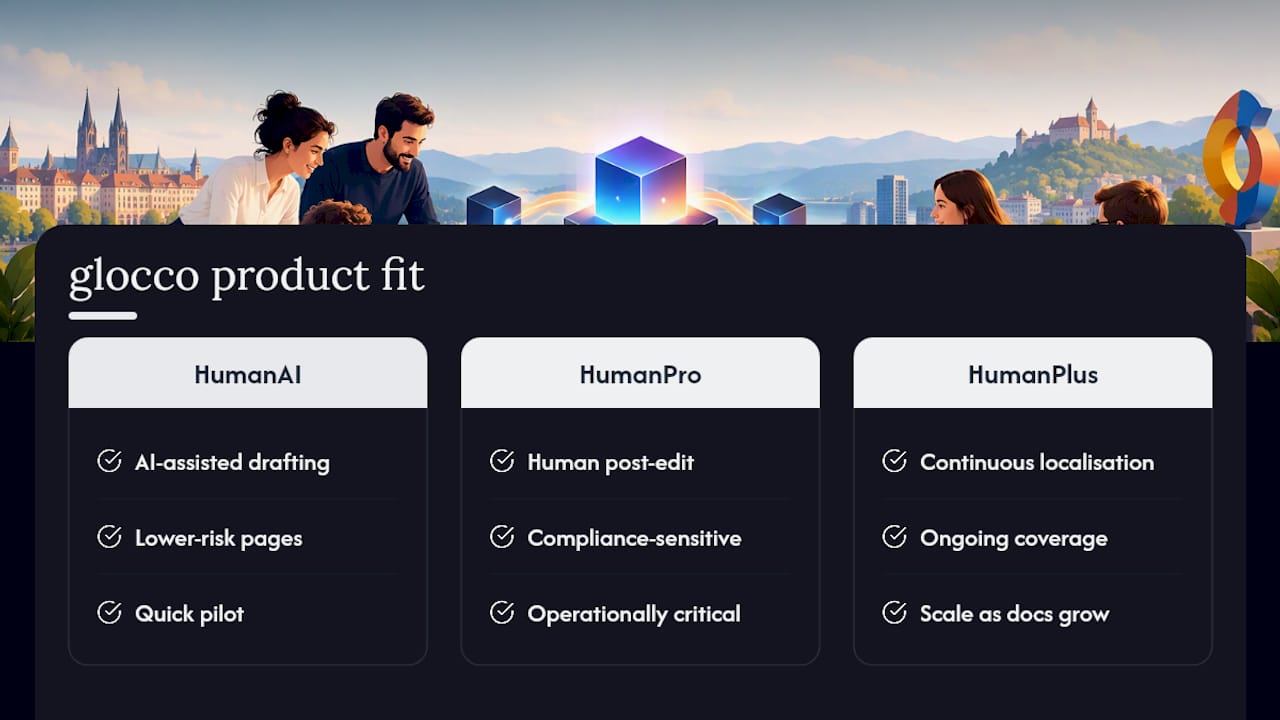
The smartest first move? Pilot it small. Pick ten runbooks, run them through a hybrid AI plus human pass, and measure the edit rate before you commit to anything bigger. Get in touch with glocco to scope a pilot and get a quote.
Sources
- GitLab Product Documentation Localization (handbook)
- How we built and automated our new Japanese GitLab docs site
- ChatGPT Translate in CI: Automate Docs & Runbooks
FAQ
What’s the biggest risk when translating DevOps documentation?
The biggest risk is a translator, human or AI, silently altering something machine-readable: a YAML key, an indentation level, a placeholder token. A normalisation layer that protects these before translation starts is the single most effective safeguard.
Should we use AI or human translators for DevOps docs?
Both, in sequence. Use AI for a fast first draft, then route high-risk content like incident runbooks through human post-edit, which is the two-tier pattern GitLab uses for its own docs.
How do we stop YAML files breaking after translation?
Run YAML and Markdown linters as an automated CI check before any translated file can merge, and never let a translation tool touch keys, indentation or anchors directly. Placeholder-preservation tests catch most remaining issues automatically.
Can Glocco help with translating configuration files and runbooks?
Yes. HumanAI covers fast drafting for lower-risk files, and HumanPro provides specialist post-edit for compliance-sensitive or operationally critical documentation. Current pricing for both is available on request via the glocco site.
What should we translate first if we’re just starting out?
Start with your highest-traffic pages or most critical runbooks, not your entire docs repository. This builds a curated translation memory from reviewed content, which then improves the quality of everything you translate afterwards.


