


A well-enforced terminology glossary is one of the fastest ways to cut localisation rework, protect brand consistency, and improve conversion across your UK e-commerce catalogue. Without one, rework can account for 40–60% of total correction volume on projects lacking pre-approved terms. The immediate next step? Brief your vendor or internal terminologist on a pilot of a limited set of around 40 high-visibility terms: product titles, navigation labels, and key CTAs.
glocco® builds exactly these pilots for UK e-commerce teams, with TMS integration and an audit cycle included.
Why do glossaries matter for e-commerce localisation?
Inconsistent product language fragments your catalogue. “Trainers” on one page, “sneakers” on another, and a third variant in your paid search copy means your site search, SEO, and ads are all pulling in different directions. A curated termbase fixes that at source.
The commercial consequences go well beyond tidy copy:
- On-site search and SEO: aligned terminology means your product titles match the terms UK shoppers actually type. Literal translation does not guarantee local ranking because search vocabulary varies by market.
- Conversion: consistent naming across product pages, checkout, and post-purchase emails reduces buyer confusion and abandoned carts.
- Legal and compliance accuracy: checkout phrasing, returns policies, and regulatory labels must be exact. A glossary locks those strings so no translator paraphrases them.
- Faster time-to-market: translators onboard faster when approved terms are already defined, reducing back-and-forth review cycles.
- Fewer support tickets: when product names match across the site, customers find what they searched for and contact support less often.
Three use cases where glossaries move the needle quickly: product titles and collection names (where inconsistency breaks faceted search); checkout and legal phrasing (where paraphrase creates compliance risk); and marketing snippets and paid search copy (where term drift wastes budget on non-converting variants).
What should an e-commerce glossary actually contain?
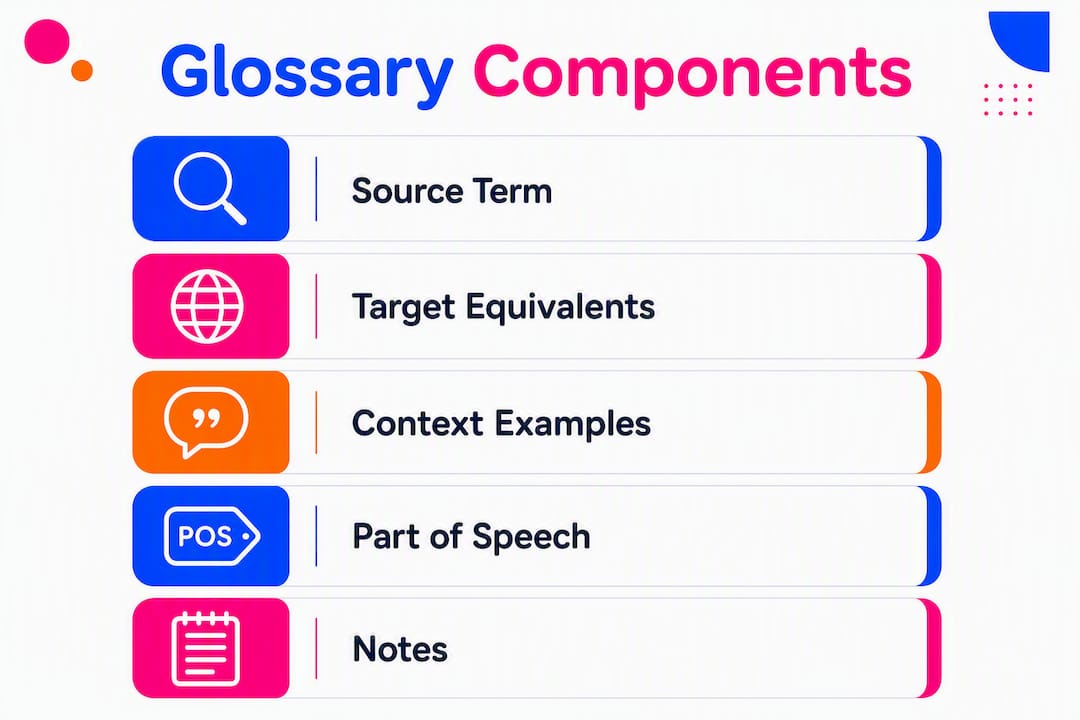
A glossary is a curated lookup table. A termbase is the structured, tool-integrated source of truth. Best-practice templates recommend a specific set of fields to make entries actionable rather than decorative.

| Field | Purpose |
|---|---|
| Source term | The approved English term (e.g. “shopping basket”) |
| Target equivalent(s) | Approved translation per locale |
| Part of speech | Noun, verb, adjective |
| Domain / context | Product category, UI, legal, marketing |
| Product / category tag | Maps term to SKU range or collection |
| Status | Active, deprecated, under review |
| Owner | Who approved the entry |
| Example sentence | Shows term in context |
| Do not use | Rejected variants (e.g. “cart”, “trolley”) |
| Date approved | Audit trail |
Sample entry (CSV format):
source_term,target_de,part_of_speech,domain,status,do_not_use,example,owner
shopping basket,Warenkorb,noun,UI/checkout,active,cart;trolley,"Add items to your shopping basket.",L.Patel
A lightweight spreadsheet works well up to around 200 terms. Beyond that, or when you need TMS/CAT integration, a TBX (TermBase eXchange) file gives you the structured attributes and machine-readable format that tools like memoQ, SDL Trados Studio, or Phrase can consume directly.
Pro Tip: A curated set of a moderate number of domain-specific terms often delivers higher consistency than a long style guide. Lookup tables are simply easier for translators to follow than prose.
How do you build a multilingual glossary for your catalogue?
Start small. A pilot of a limited set of around 40 high-visibility terms covering navigation, product titles, and CTAs covers the most visible inconsistencies and delivers ROI faster than a comprehensive build.
- Scope the pilot. Agree on target locales, content types (product titles, UI, legal), and a term ceiling (50 terms maximum for phase one).
- Extract candidate terms. Pull from your PIM, top-selling SKUs, support tickets, and paid search reports. These surface the terms customers actually use.
- Prioritise by visibility and frequency. Terms appearing in navigation, page titles, and CTAs rank highest. Legal strings come next.
- Draft entries. A terminologist or bilingual subject-matter expert (SME) drafts source term plus target equivalents, with context sentences and “do not use” variants.
- SME review. Product owner confirms brand accuracy; legal reviewer signs off compliance strings; language lead validates target equivalents.
- Approve and publish. Assign a status of “active”, version the file, and distribute to all translators and tools.
- Integrate. Load the glossary into your TMS/CAT tool so terms surface in-editor. Add to MT prompt configuration. Align field names with your PIM.
- QA pass. Run a terminology-specific QA check on the first translated batch before launch.
RACI at a glance: the product owner proposes terms and owns scope; the terminologist or linguist drafts and maintains entries; legal SME approves compliance strings; the localisation engineer integrates the file into tools; procurement or vendor lead coordinates external delivery.
Make glossary sign-off part of your “definition of done” for any feature or collection launch. That single gate prevents naming drift from reaching production.
How do you keep a glossary current and trusted?
A single named owner and a defined SLA are the minimum governance requirements. Without them, glossaries go stale within two product cycles.
Recommended roles and cadence: a terminology owner (or terminologist) handles day-to-day maintenance and responds to change requests within five business days for high-impact terms. Language leads flag target-language issues. The legal SME reviews any compliance string changes. The product owner approves scope changes.
For versioning, follow an approve → publish → audit cycle. Every change gets a version number, a date, and the approver’s name. Deprecated terms stay in the file with a “deprecated” status rather than being deleted, so translators know why a term changed and what replaced it.
Pro Tip: Add a glossary update task to your sprint or release checklist. A five-minute check at each release prevents months of accumulated drift.
Governance checklist:
- [ ] Named terminology owner assigned
- [ ] Change request process documented
- [ ] SLA defined (e.g. 5 business days for high-impact terms)
- [ ] Version control in place (file name + changelog)
- [ ] Deprecated state used (never delete old entries)
- [ ] Quarterly audit scheduled
- [ ] Glossary update included in release checklist
How do glossaries fit into your localisation and commerce stack?
Integrating your glossary with your TMS/CAT tool and PIM is the operational pivot. A glossary attached to a CAT tool surfaces approved terms at the segment level, reducing cognitive load and cutting the review rounds that cost time and money.
Integration checklist:
- TMS/CAT (e.g. memoQ, Phrase, SDL Trados Studio): load the TBX or CSV so terms appear as in-editor suggestions. Flag unapproved variants as QA warnings.
- MT prompt injection: include approved terms in the system prompt or glossary parameter of your MT engine (DeepL API, Google Cloud Translation) to constrain output.
- PIM/PXM (e.g. Akeneo, Contentful): align glossary field names with your PIM attribute schema so product titles and category names are consistent at source, before translation.
- CMS / help centre: surface approved terms in your authoring interface so copywriters use them at the point of writing, not just at translation.
- API/TBX sync: for larger catalogues, automate glossary distribution via API so every tool always reads the latest approved version.
AI translation workflows need an extra step. Generative models may substitute synonyms even when a glossary is injected, so a terminology-specific QA pass after MT output is non-negotiable. Pair this with AI tools built for localisation workflows to automate the QA check rather than running it manually.
Pro Tip: Surface glossary rules inside your component library and authoring UX. When copywriters see approved terms at the point of writing, you prevent terminology problems before translation even begins.
For teams building or rebuilding their e-commerce stack, aligning glossary entries with your PIM and site architecture from the outset avoids expensive retrofitting later.
How do you measure the ROI of a glossary?
Measure both efficiency (reduced rework time) and revenue signals (conversion and SEO visibility).
| KPI | Why it matters | How to measure | Target |
|---|---|---|---|
| Terminology QA fails per batch | Tracks raw inconsistency rate | TMS QA report | Reduce by 50% after pilot |
| Average review cycles per release | Measures rework cost | Project management log | From 3+ cycles to 1–2 |
| Time-to-market for local launches | Shows speed improvement | Release date log | Reduce by 20% |
| Organic ranking for target search terms | Validates search vocabulary alignment | Google Search Console | Upward trend within 90 days |
| Support ticket volume for product confusion | Measures customer-facing clarity | CRM / helpdesk | Measurable reduction per quarter |
Worked example: a UK retailer releasing 10 localised collections per year, each requiring three review rounds at an average of two hours per round, spends 60 hours annually on terminology rework alone. A glossary that cuts review rounds from multiple to fewer can save substantial hours and costs annually, before accounting for reduced support tickets and improved conversion from cleaner product copy.
What are the most common glossary pitfalls and how do you fix them?
The most common failure is a glossary that exists but is neither used nor updated. Here is where teams go wrong, and what to do about it:
- Glossary too large at launch: a 500-term glossary built in one sprint overwhelms reviewers and never gets approved. Fix: cap the pilot at around 40 terms and expand quarterly.
- No governance owner: entries drift because nobody is responsible. Fix: assign a named terminology owner before the first term is drafted.
- Not integrated with tools: a spreadsheet nobody opens is not a glossary. Fix: load it into your TMS/CAT as the first integration task, not an afterthought.
- Ignoring UK search vocabulary: translating from another English variant (or another language) without checking UK search demand means your titles are grammatically correct but commercially invisible. Fix: validate every high-visibility term against Google Search Console data for the UK market. “Trainers” outperforms “sneakers” in the UK; “autumn/winter collection” outperforms “fall collection.”
- Treating localisation as translation only: localisation must include market vocabulary and attribute adaptation, not just translated strings. Fix: include a market vocabulary review step in your approval workflow.
- No “do not use” variants: without rejected variants documented, translators reintroduce them. Fix: add a “do not use” field to every entry from day one.
UK implementation checklist: your 90-day pilot plan
A three-phase, 90-day pilot, covering discover, validate, and integrate, is the most practical path to production value.
| Phase | Days | Tasks | Roles |
|---|---|---|---|
| Discover | up to 50 | Extract candidate terms from PIM, top SKUs, support tickets, paid search | Product owner, terminologist |
| Discover | up to 50 | Prioritise by visibility (navigation, titles, CTAs, legal strings) | Product owner, legal reviewer |
| Validate | — | Draft entries with target equivalents, context sentences, “do not use” variants | Terminologist / linguist |
| Validate | — | SME review: brand accuracy, legal sign-off, language lead approval | Legal SME, language lead |
| Validate | — | Publish initial glossary (TBX/CSV); assign governance owner | Localisation engineer, terminology owner |
| Integrate | — | Load into TMS/CAT; configure MT prompt injection; align PIM fields | Localisation engineer |
| Integrate | — | Run terminology QA on first translated batch; log QA fail rate | Terminologist, QA lead |
| Integrate | — | Audit entries against UK search vocabulary; schedule quarterly review | Product owner, terminologist |
UK-specific notes: validate all product and category terms against UK English conventions (colour, not color; autumn, not fall; postcode, not zip code). Check legal phrasing against UK Consumer Rights Act requirements. Confirm currency formatting (£ with no space) and measurement units (metric for most product specs, imperial where UK convention demands it, such as screen sizes in inches).
glocco®’s perspective: why small glossaries beat big style guides
The conventional wisdom says you need a comprehensive style guide before you can localise properly. glocco®’s experience across e-commerce, fintech, and legal clients tells a different story. A curated glossary of around 40 terms, properly governed and integrated, delivers more measurable consistency than a 60-page style guide that translators skim once and then ignore.
Style guides require judgement. Glossaries require lookup. When you are running MT at scale or onboarding a new linguist mid-sprint, a fact table wins every time.
The other thing teams underestimate is the search vocabulary dimension. A glossary built purely from internal product naming, without a UK search demand check, can produce perfectly consistent copy that nobody finds. glocco® builds that market vocabulary step into every pilot, cross-referencing approved terms against Google Search Console data for the UK market before the first entry is finalised.
For teams managing e-commerce translation at scale, the glossary is not a nice extra. It is the foundation that makes everything else, TM leverage, MT quality, review speed, measurable.
Ready to build your glossary? Here is what a glocco® pilot looks like
glocco® delivers pilot glossary builds for UK e-commerce teams faster than an in-house build from scratch. A typical pilot covers around 40 terms, a TBX and CSV export, TMS integration, and one audit cycle, usually completed within four to six weeks.
The concrete advantage over a DIY approach: glocco®’s terminologists bring UK market vocabulary validation and localisation expertise built across 76 languages, so your glossary is search-aligned and compliance-ready from day one, not after three rounds of corrections.
For procurement teams writing an RFP: include your target locales, content types (product, UI, legal), approximate term count, and your TMS platform. That information is enough for glocco® to scope and price a pilot accurately.
To get started, explore glocco®’s AI-powered translation and glossary workflows or contact the team directly at glocco.com to request a pilot brief.
Templates, downloads and further reading
- Localisation is not translation: taking a catalogue into new markets — essential reading on UK search vocabulary alignment and why literal translation fails commercially.
- glocco® e-commerce translation guide — operational guidance on reducing rework and improving product copy for UK e-commerce.
- Content localisation guide for e-commerce brands — explains where glossaries fit within a full localisation programme.
- Legal terminology translation workflow — five-step workflow for handling compliance strings and legal SME governance.
For UK-specific implementation, always validate search vocabulary against Google Search Console data for the GB market, and confirm legal phrasing with a qualified UK legal reviewer before publishing. This article is general guidance, not legal or compliance advice.


